CADCraft: The free, open-source CAD app for DWG and DXF
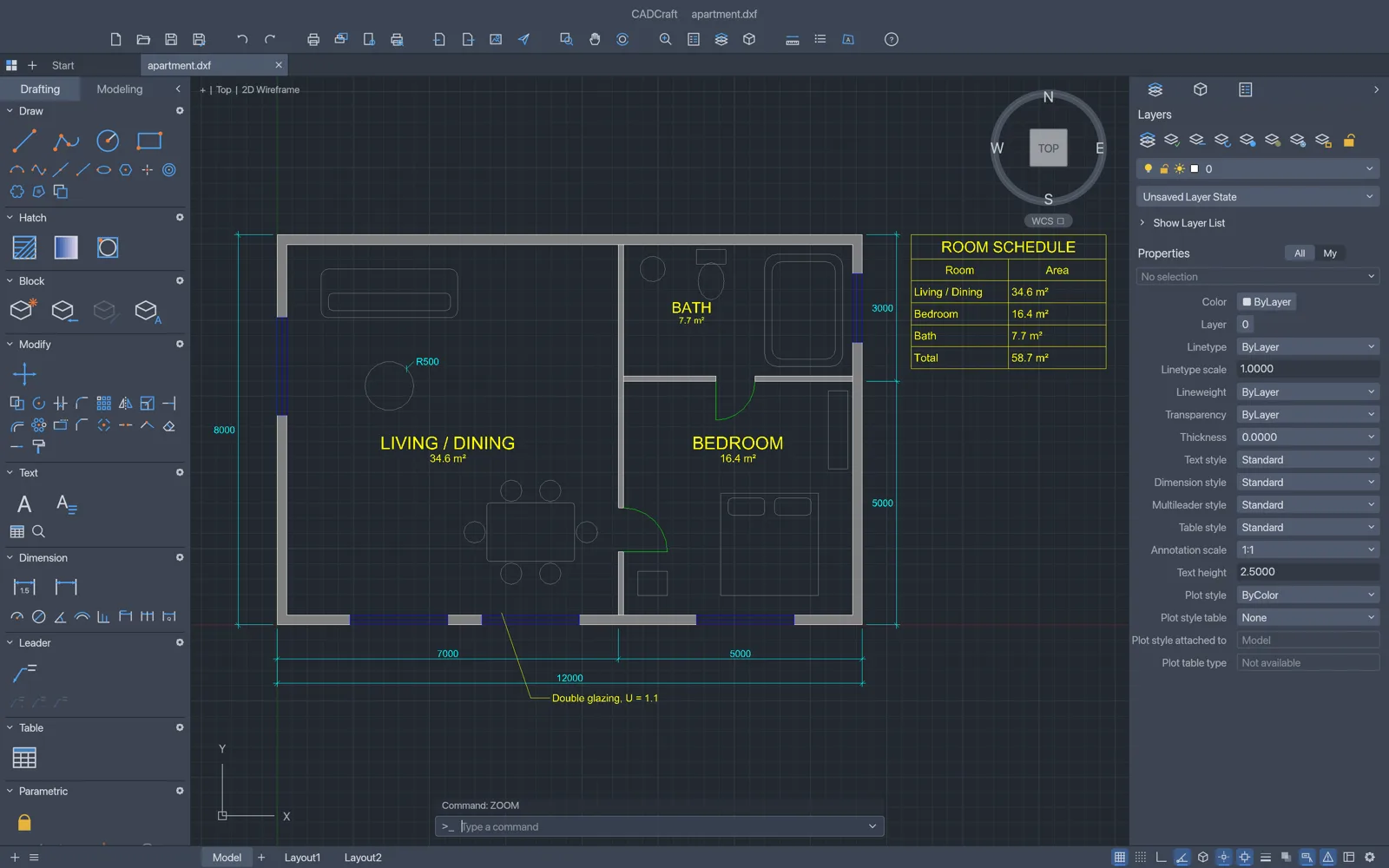
Type L, click two points, type @5<45 and press Enter. CADCraft keeps AutoCAD’s command line, snaps, grips and layers. Open a DXF right here in your browser, or a DWG in the free desktop app.
Got a DWG?
How to open a DWG file without AutoCAD
Free, with the CADCraft desktop app for Windows, Mac or Linux. Only have a DXF? That one opens right here in your browser.
- 01
Download CADCraft
Get the installer for your system from the download table below: a signed MSI on Windows, a notarized app on Mac, AppImage or .deb on Linux.
- 02
Open the DWG
Choose File › Open and pick the .dwg. CADCraft opens DWG files saved by AutoCAD R13 to 2018.
- 03
View, edit or convert
Pan, zoom and switch layers, edit with the usual commands, then save as DWG or DXF, or plot to PDF.
What is CADCraft
What is CADCraft?
CADCraft is an open-source CAD app for floor plans, part drawings and site plans: the drafting people open AutoCAD for. The command line, prompts with clickable keywords, object snaps, polar tracking, grips and right-click to repeat behave the way years of drafting habit expect.
It reads and writes DWG and DXF, plots to PDF and exports SVG and PNG. It is free, with no account and no subscription, and the same app runs in the browser, so the CADCraft on this site opens a DXF on any computer, Chromebooks included. DWG files open in the desktop app for now.
- 1.
AutoCAD’s command line
Aliases, @x,y and @d<a input, transparent commands.
- 2.
DWG and DXF
Open and save, no converter needed.
- 3.
Paper space
Layouts, viewports, page setups and PLOT.
- 4.
Open source
Free under MIT or Apache-2.0, no account.
File formats
DWG and DXF: what CADCraft opens and saves
That makes CADCraft a free DWG to DXF and DWG to PDF converter as well. One caution: objects CADCraft does not model yet are dropped when it saves, so keep the original file.
| Feature | Open | Save or export |
|---|---|---|
| DWG | R13 to 2018, desktop app only | Saves as R2000 DWG |
| DXF, ASCII and binary | R12 to 2018, online too | Saves as R2000 DXF |
| Dimension styles, tables and constraints | Read from DXF | Kept in DXF |
| No | PLOT and EXPORTPDF | |
| SVG and PNG | No | Export |
Command line
Type AutoCAD commands, or let Claude type them
The command line works the way it does in AutoCAD. The same commands are open to scripts and to AI agents through CADCraft’s MCP server.
- Prompts with clickable [Keywords], AutoComplete, aliases and history.
- @dx,dy, @d<a and direct distance entry; Enter, Space or right-click repeats.
- Agents type at the prompt with command_line, check their work with inspect_drawing and see it with render.
Run .scr-style scripts too. CADCraft on GitHub
# At the CADCraft prompt$ line 0,0 @10,0 @0,5 c$ circle 5,2 1$ offset 0.25$ zoom e# Let Claude Code or Codex draw over MCP$ claude mcp add cadcraft -- cadcraft-cli mcp$ codex mcp add cadcraft -- cadcraft-cli mcp# Convert without opening the app$ cadcraft-cli convert drawing.dwg drawing.svgWhat works today
AutoCAD commands in CADCraft
CADCraft 0.5.0 is in early, fast development. This is what its own feature table lists as working, and what is still missing.
Works todayNot yet
Draw
- LINE, PLINE with arcs and widths: Works today
- CIRCLE, ARC, ELLIPSE, DONUT: Works today
- RECTANG, POLYGON, SPLINE: Works today
- XLINE, RAY, POINT: Works today
- TEXT and MTEXT: Works today
Modify
- MOVE, COPY, ROTATE, SCALE, MIRROR: Works today
- OFFSET, TRIM, EXTEND, STRETCH: Works today
- FILLET, CHAMFER, BREAK, JOIN: Works today
- Rectangular and polar ARRAY: Works today
- EXPLODE, OVERKILL, draw order: Works today
Precision
- Object snaps, tangent and perpendicular too: Works today
- Polar tracking, ortho, grid snap: Works today
- Hot grips: stretch, move, rotate, scale, mirror: Works today
Annotate
- All DIM commands with DIMSTYLE: Works today
- Associative dimensions: Works today
- MLEADER and TABLE: Works today
- HATCH with islands and gradients: Works today
- SHX fonts: Not yetstroke font stands in
Organise and plot
- Layers and Layer Properties Manager: Works today
- BLOCK, INSERT, attributes, nested blocks: Works today
- Paper-space layouts and viewports: Works today
- Page setups, PLOT, EXPORTPDF: Works today
Parametric
- Geometric and dimensional constraints: Works today
- AUTOCONSTRAIN and PARAMETERS: Works today
- Every DWG object type: Not yetunmodelled ones drop on save
The interface is in English and Ukrainian. Text in a font your system lacks, Chinese for example, is drawn from an installed font that has the characters.
Model and paper space
From floor plans to plotted part drawings
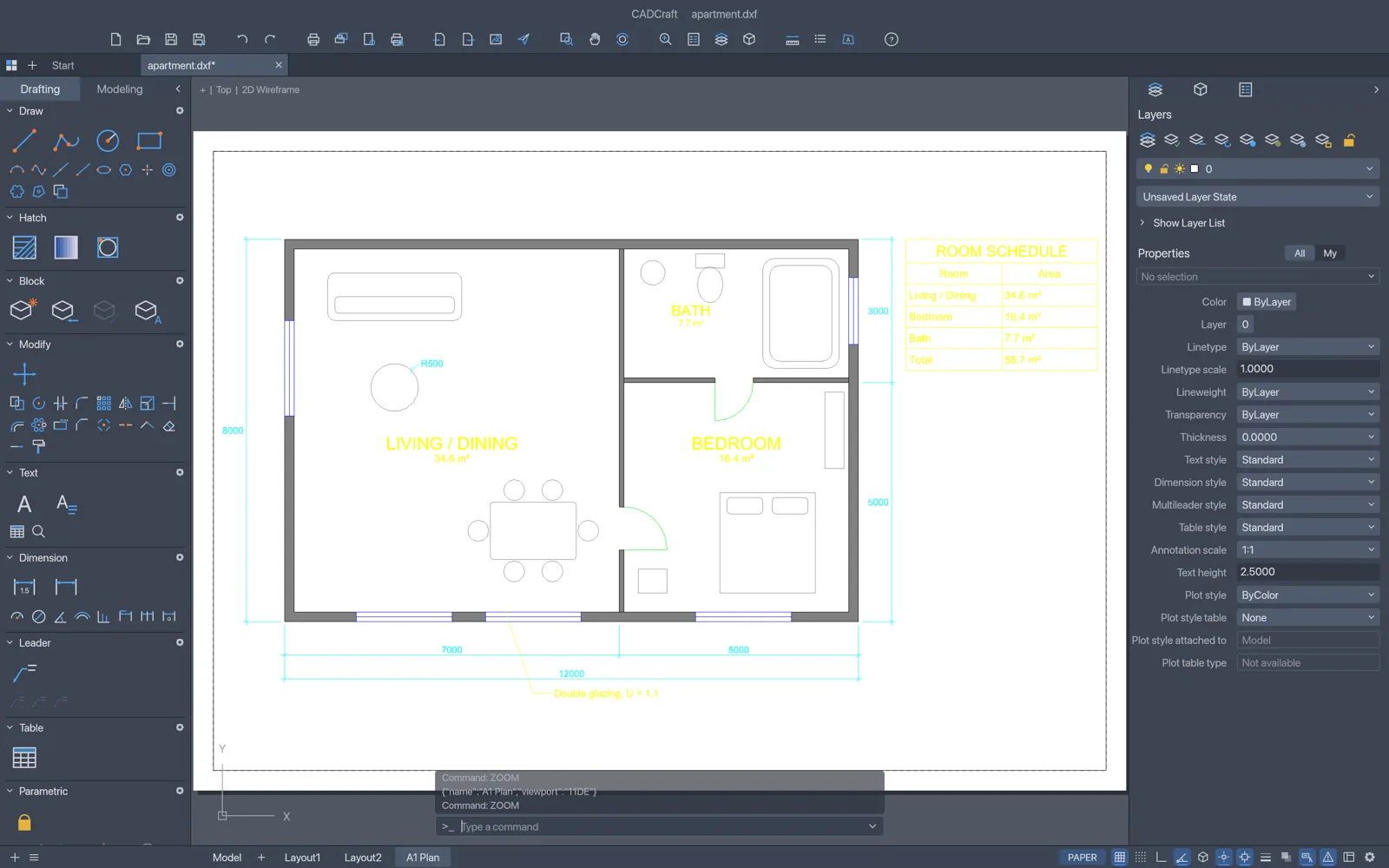
Layouts
Plot from paper space
Put the model on a sheet with viewports at a set scale, lock them, freeze layers per viewport and plot the layout to PDF.
- MSPACE and PSPACE through viewports
- Page setups with paper sizes
- Layer freeze per viewport
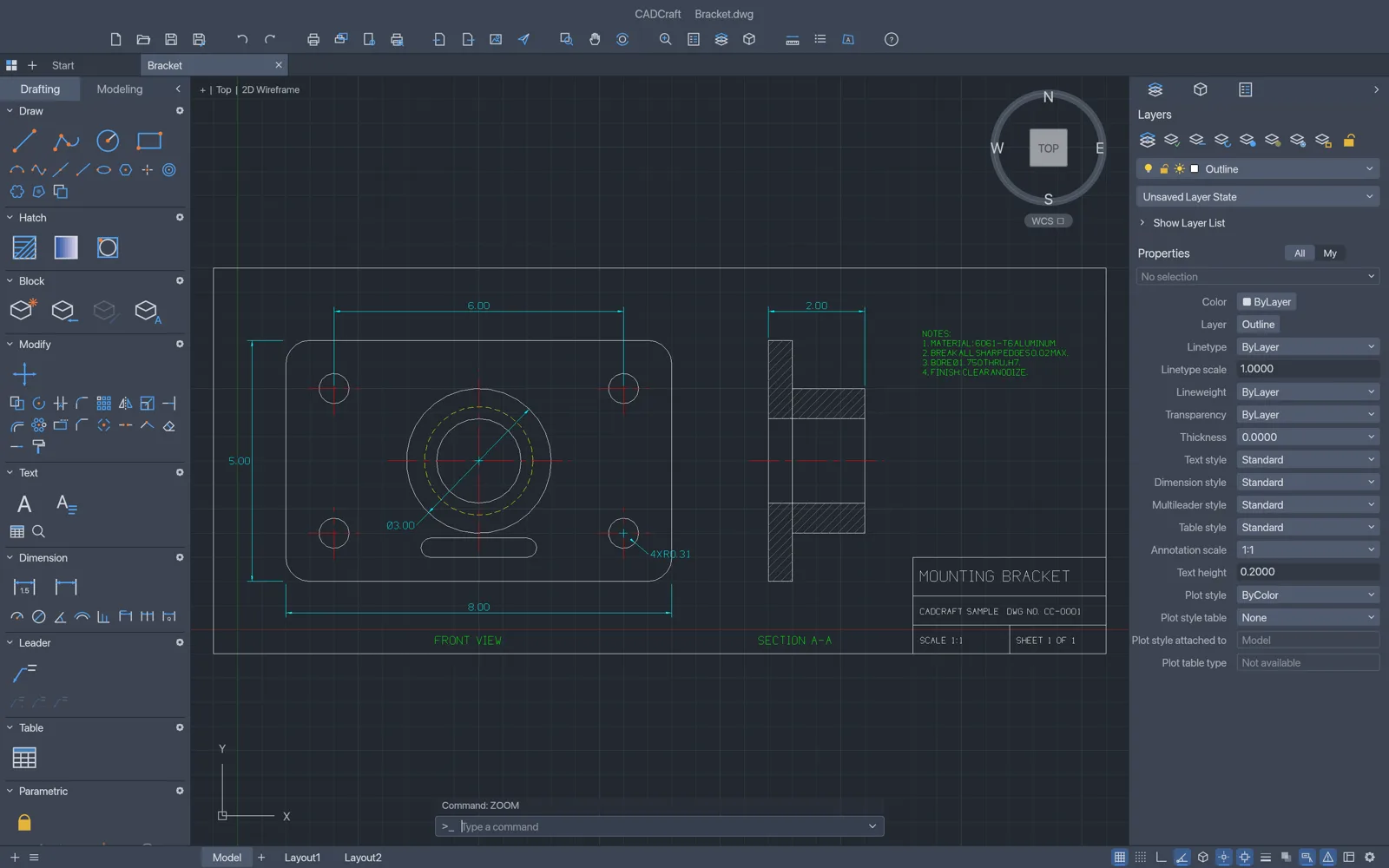
Mechanical
Dimensions, hatches and title blocks
Every DIM command with full DIMSTYLE control, associative dimensions that follow the geometry, and pattern, solid or gradient hatches.
- Centre marks and leaders
- Section hatching with islands
- Blocks with attributes for title blocks
For AutoCAD users
CADCraft vs AutoCAD LT
As a free AutoCAD alternative for 2D drafting, CADCraft keeps the habits and the files. It is young, so check your own drawings before you rely on it.
| Feature | CADCraftFree | AutoCAD LT |
|---|---|---|
| Price | Free forever | Yearly subscription |
| Runs on | Browser, Windows, macOS, Linux, FreeBSD | Windows and macOS |
| DWG | Opens R13 to 2018, saves R2000 | Native, current version |
| Command line, aliases and snaps | Yes | Yes |
| Layouts, viewports and PLOT | Yes | Yes |
| SHX fonts | Not read yet | Yes |
| Automation | Scripts, CLI and an MCP server for AI agents | Scripts and AutoLISP |
| Maturity | Early development, released October 2026 | Mature |
CADCraft download
Every link is the official CADCraft 0.5.0 build on GitHub. Prefer not to install anything? Open CADCraft online instead.
| System | Main download | Also available |
|---|---|---|
| Windows (64-bit) | cadcraft-0.5.0-windows-x64.msi · 16.4 MB | portable ZIP · 21.6 MB, ARM64 and 32-bit |
| macOS (Apple silicon and Intel) | cadcraft-0.5.0-macos-universal.dmg · 27.6 MB | command-line tool · 13.7 MB |
| Linux (x86_64) | AppImage · 21.5 MB | .deb · 23.1 MB, .rpm · 23.0 MB, Flatpak · 15.2 MB |
| Linux (ARM64) | AppImage · 19.9 MB | .deb · 21.8 MB, Flatpak · 13.2 MB |
| FreeBSD 14 | tarball · 24.5 MB |
The Windows installers are code-signed, the Mac app is notarized by Apple, and SHA256SUMS.txt lists a checksum for every file.
Yes. CADCraft is free and open source under MIT or Apache-2.0, with no account and no subscription.
Not yet. The online version opens DXF files: open CADCraft online, then use File › Open or drop the .dxf on the page. It is read inside your browser and never uploaded. For a DWG, use the free desktop app, or save it as DXF there and carry on online.
DWG from R13 to 2018 and DXF from R12 to 2018, in ASCII or binary. It saves DWG and DXF in the R2000 format, which current CAD apps, AutoCAD included, open.
Open the DWG in CADCraft, then plot or use EXPORTPDF for a PDF, or save as DXF. From a terminal, cadcraft-cli convert drawing.dwg drawing.svg converts in one step.
Yes. The Mac app is a universal build for Apple silicon and Intel, signed and notarized, and opens DWG and DXF. The online version opens DXF in Safari or Chrome on any Mac.
CADCraft does not read SHX fonts yet. Text in an SHX style is drawn with its own single-stroke font, and characters the font lacks, CJK for example, come from an installed font such as Noto Sans CJK or PingFang.
It can. Objects CADCraft does not model yet are not kept on save. Work on a copy and keep the original DWG.
No. PhotoCraft Editor is an independent site that hosts the official CADCraft web build and links to the official downloads. The project lives on GitHub.
Open your drawing in CADCraft
The full CAD app, free in your browser. Start with the sample drawing, or drop in a DXF.
Colophon
The screenshots on this page are from the CADCraft repository (MIT or Apache-2.0), rendered by CADCraft itself.
PhotoCraft Editor is an independent site. It is not affiliated with ArtCraft or Autodesk, or with any design firm named CADCraft. AutoCAD and DWG are trademarks of Autodesk, Inc.