FilmCraft: The free, open-source Premiere Pro alternative
A multi-track timeline, Lumetri-style color, keyframes and loudness meters, laid out the way Premiere users expect. Open FilmCraft in your browser in seconds, or install it on any desktop.
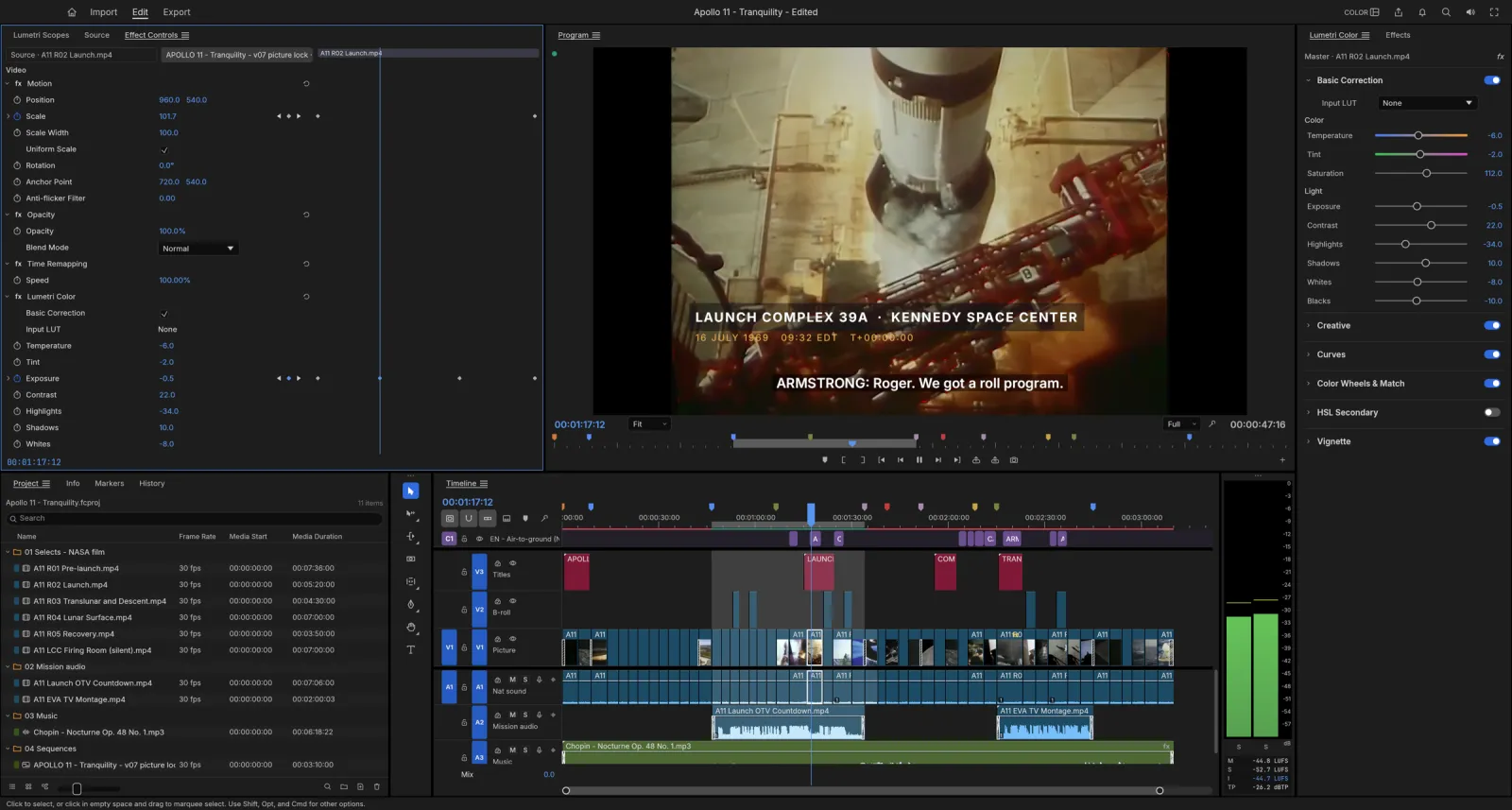
Opens your media
What is FilmCraft
What is FilmCraft?
FilmCraft is an open-source video editor that rebuilds the Premiere Pro workflow from scratch in Rust: Source and Program monitors, bins, a multi-track timeline, every trim tool, Lumetri-style color, keyframes and an audio mixer. The menus, workspaces and shortcuts sit where Premiere users expect them, so your hands already know FilmCraft.
It is free, with no account and no subscription. The H.264, HEVC, ProRes and AAC codecs are FilmCraft’s own code, and the same engine compiles to WebAssembly, so the FilmCraft editor on this site is the full app running in your browser. Your footage never leaves your computer.
- 1.
A Premiere-style timeline
Monitors, bins, patching, trims and the same shortcuts.
- 2.
Lumetri-style color
Curves, color wheels and HSL Secondary, with live scopes.
- 3.
Its own codecs
H.264, HEVC, ProRes, AV1 and more, with no FFmpeg inside.
- 4.
Open source
Free forever under MIT or Apache-2.0.
FilmCraft features
Edit, grade and mix the way you do in Premiere
FilmCraft covers the work editors open Premiere Pro for: cutting, trimming, color, effects, sound and delivery.
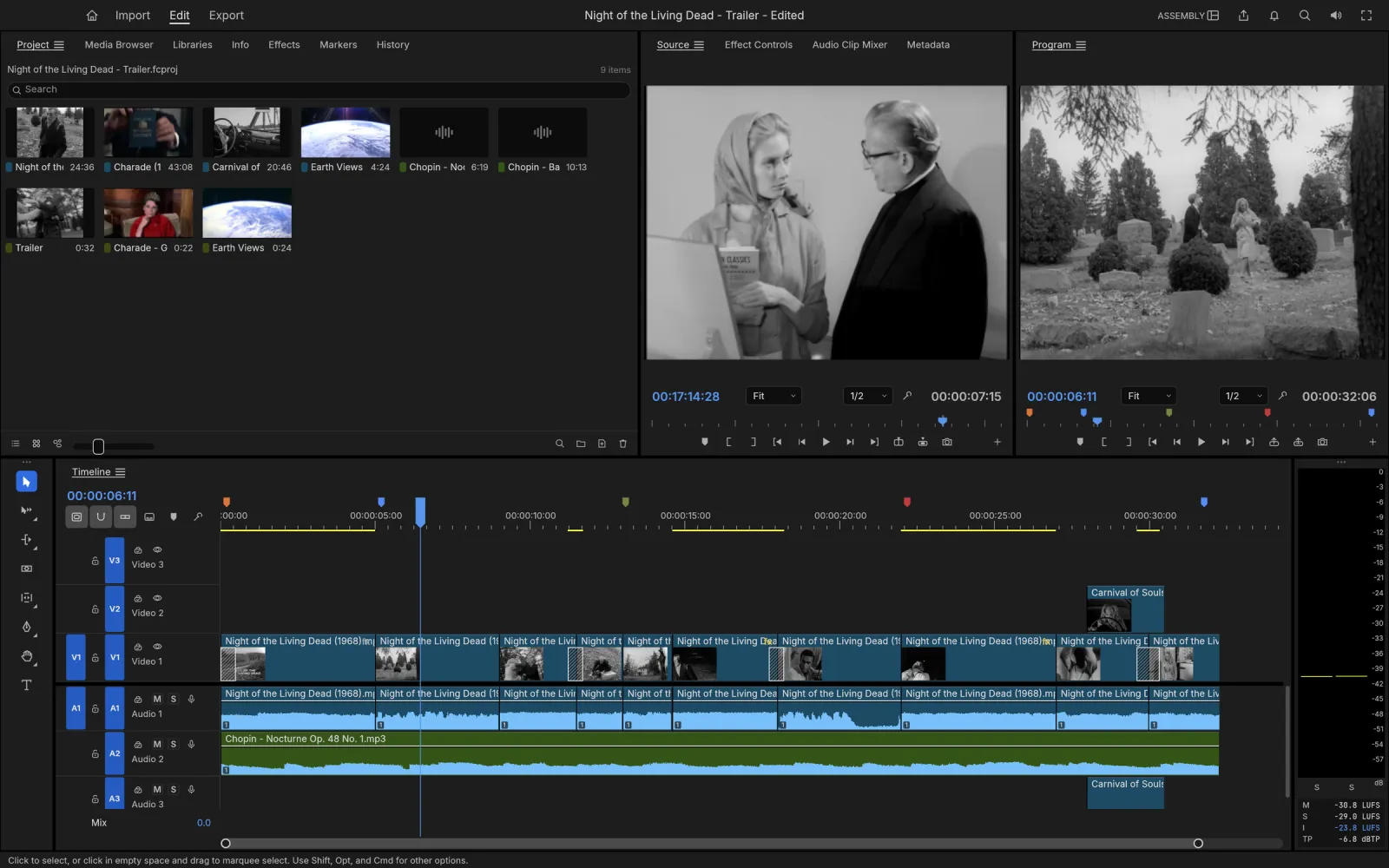 Premiere key layouts
Editing
A timeline your hands already know
Source and Program monitors, bins with thumbnails and a multi-track timeline with patch and target buttons. Mark In and Out, then insert or overwrite with the same keys as Premiere.
- Ripple, roll, slip, slide, rate stretch and razor tools
- Dynamic trimming with J, K and L while it plays
- Frame-exact time, even at 23.976 and 29.97 drop-frame
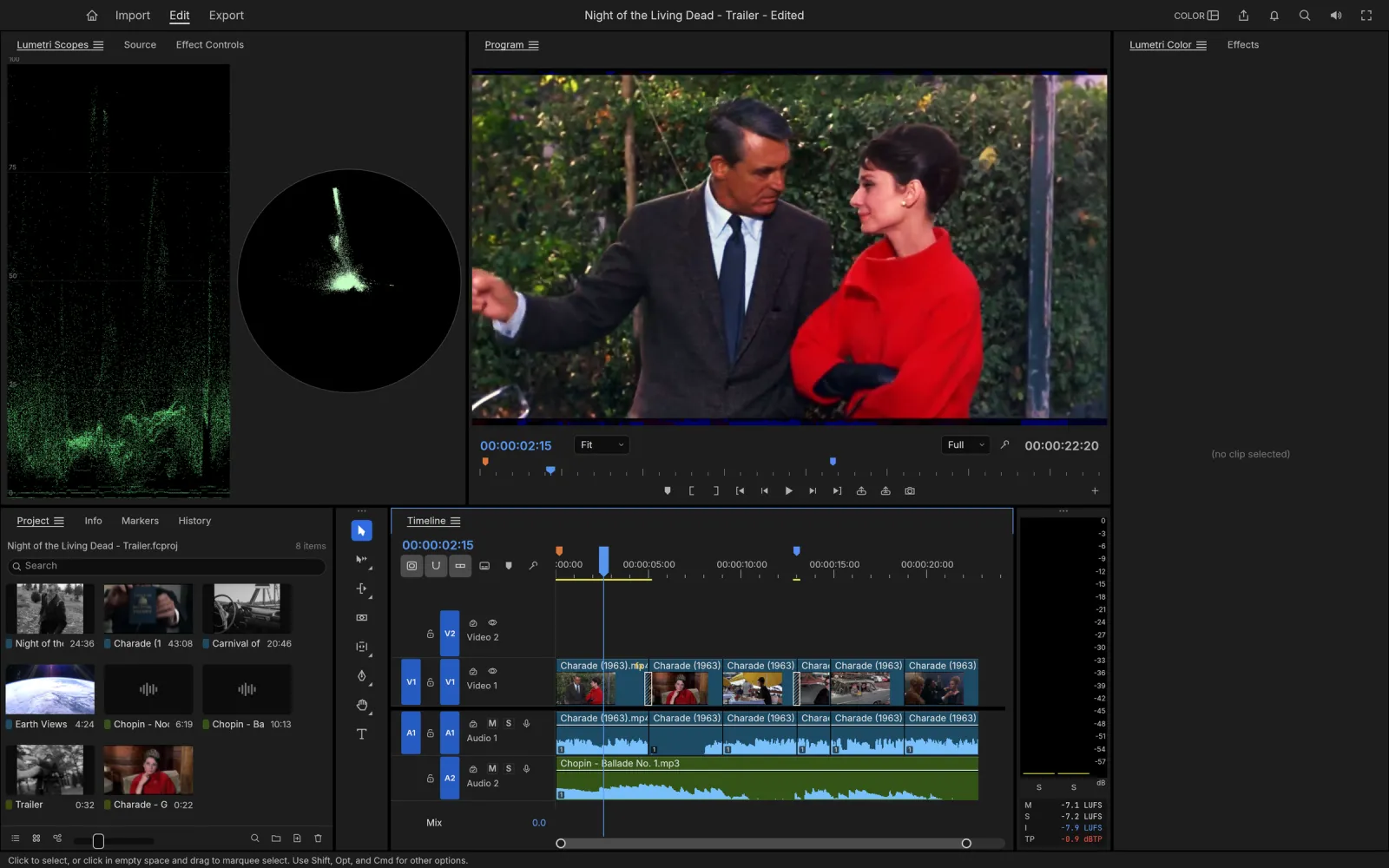 Linear light, 32-bit
Color
Lumetri-style color with scopes you can trust
Basic Correction, Creative looks, Curves, Color Wheels, HSL Secondary and Vignette, in the order a colorist works. FilmCraft grades in linear light at 32-bit float.
- Waveform and vectorscope computed from the graded frame
- Eight built-in looks with an intensity control
- Hue vs saturation, hue vs hue and luma vs saturation curves
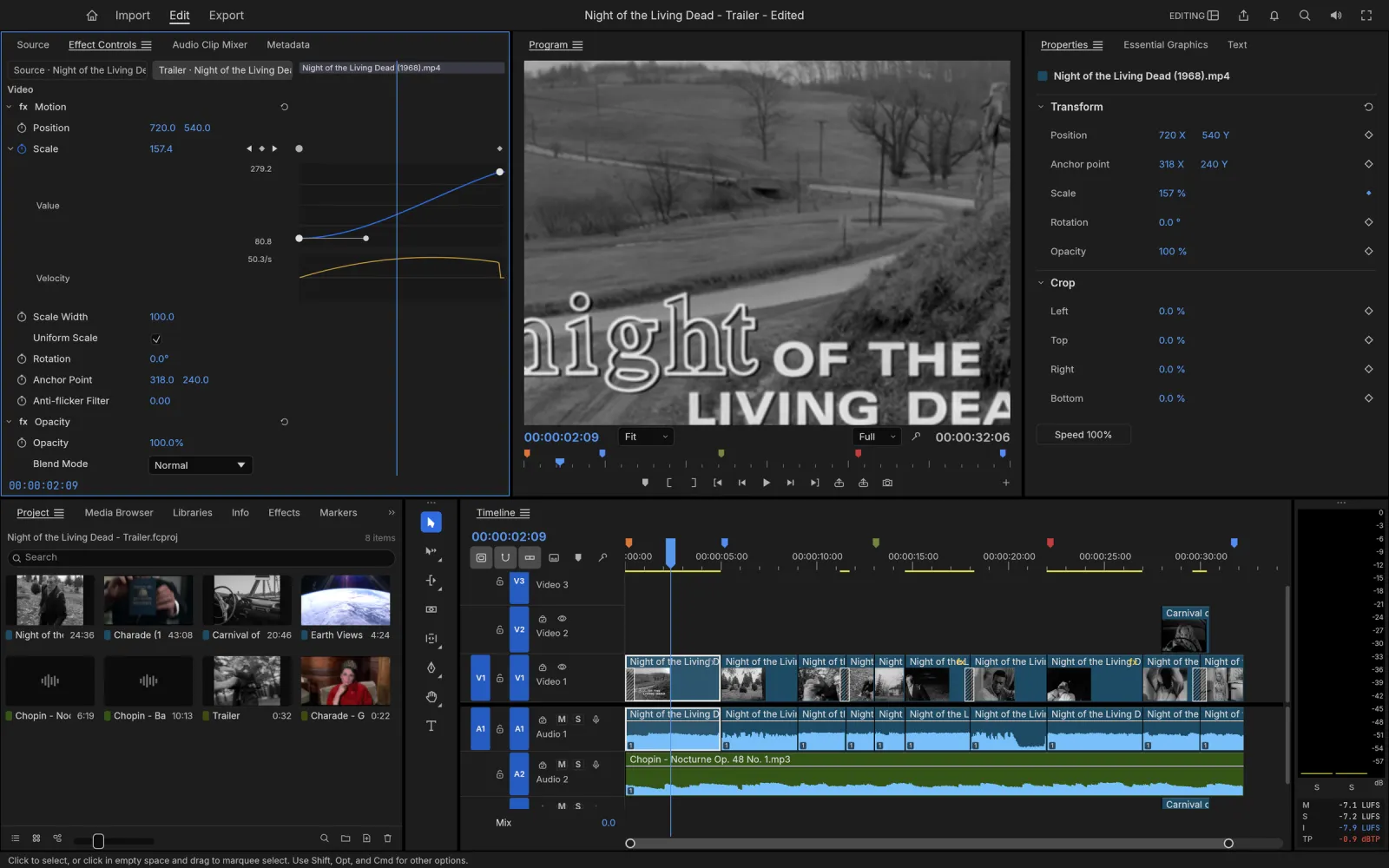 93 video effects
Effects and motion
Keyframes with real value and velocity graphs
Motion and opacity on every clip, 26 blend modes, the full Video Effects bin and transitions from cross dissolves to page peels. Every animated parameter opens into value and velocity graphs with Bezier handles.
- Linear, Bezier, hold, ease in and ease out keyframes
- 93 video effects, including Ultra Key and Warp Stabilizer
- A GPU compositor that blends in linear light
 No FFmpeg inside
Export and interchange
Deliver the cut, or hand it to another editor
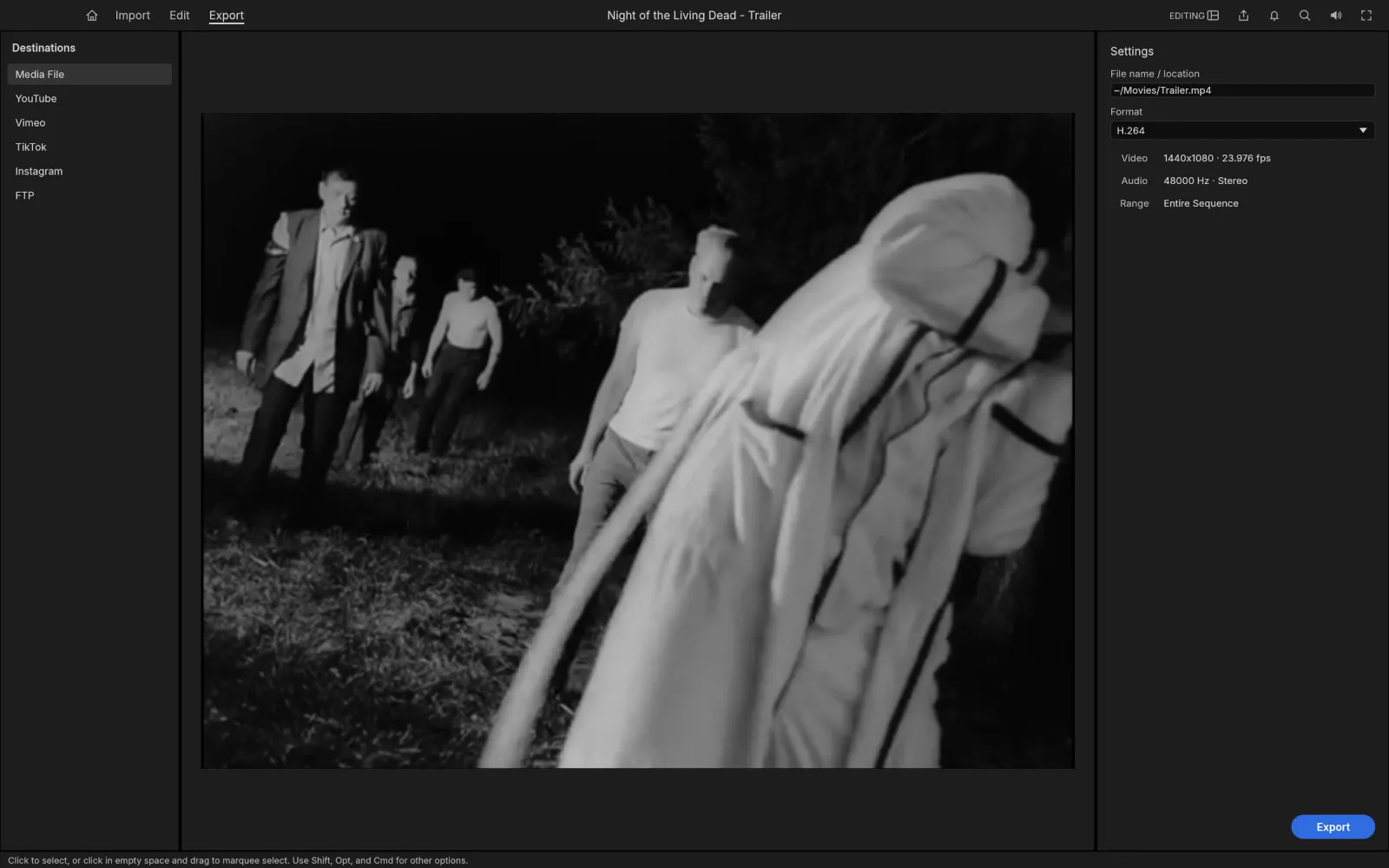
Export H.264 MP4 with AAC, ProRes 422 HQ, DNxHR, PNG sequences, animated GIF and WAV while you keep editing. Move timelines to Premiere, DaVinci Resolve, Final Cut Pro or Avid through XML, OpenTimelineIO, AAF and EDL.
- Background export with progress and cancel
- Captions as SRT, WebVTT and SCC, or burned into the picture
- Loudness meters to EBU R128 and ITU-R BS.1770
- Stars on GitHub
- 6.0k
- Desktop downloads
- 162k+
- Commands for scripts and agents
- 650+
- Video effects
- 93
Toolbox
The full FilmCraft toolbox
The tools, panels and formats of a professional editor, ready from the first launch.
- 01
Every trim
Trim mode, the Trim Monitor, ripple and roll on edit points, Q and W to the playhead, and dynamic trims as one undo step.
- 02
Multicam and nesting
Multi-camera editing, nested sequences, sequence tabs and your own saved workspaces.
- 03
Titles and captions
A real text engine with Type, Shape and Pen tools, plus caption tracks in Subtitle, CEA-608, CEA-708 and Teletext.
- 04
A full audio mixer
Track and clip mixers, sends, submixes, automation in Read, Latch, Touch and Write, EQ, DeNoise and a true-peak limiter.
- 05
Moves between editors
Final Cut Pro 7 XML, FCPXML, OpenTimelineIO, CMX 3600 EDL, AAF and OMF, in and out.
- 06
Never lose work
Atomic saves, rolling auto-save versions and a crash-recovery journal written a second after each edit.
Compare
FilmCraft vs Premiere Pro
You get the core Premiere Pro workflow for free. Here is where the two match and where Premiere still leads.
| Feature | FilmCraftFree | Adobe Premiere Pro |
|---|---|---|
| Price | Free forever | Monthly subscription |
| Source code | Open source, MIT or Apache-2.0 | Closed |
| Account required | No | Adobe ID |
| Runs on | Browser, Windows, macOS, Linux, FreeBSD | Windows and macOS, no Linux |
| Timeline, trims, multicam, nesting | Yes | Yes |
| Lumetri-style color and scopes | Yes, in linear light | Lumetri |
| Export codecs | H.264, ProRes, DNxHR; no HEVC or AV1 yet | H.264, HEVC, AV1 and more |
| Plug-ins (VST3, OpenFX) | Not yet | Yes |
| AI features | Optional speech to text | Generative Extend, auto captions |
| Maturity | Young; the team rates it 50 to 60% ready for real projects | Mature, since 2003 |
Get FilmCraft
Use FilmCraft online or on any desktop
One editor, wherever you cut. Every desktop build links to the official signed release on GitHub.
FilmCraft online
Open the full editor in Chrome, Edge or Safari. Nothing to install, and your footage stays on your computer.
Browser · no installWindows
Signed installers and portable ZIPs for 64-bit, ARM64 and 32-bit PCs.
MSI · portable ZIPmacOS
One universal app for Apple silicon and Intel Macs, signed and notarized by Apple.
Universal DMGLinux
AppImage, Flatpak, .deb, .rpm or a tarball, for x86_64 and ARM64.
AppImage · Flatpak · .deb
How to use FilmCraft
How to use FilmCraft online
- 01
Open the editor
Press Open FilmCraft online. The app loads once, then your browser keeps it ready for your next visit.
- 02
Bring in your footage
Drop video, audio and stills anywhere on the window, or use File › Import. Nothing is uploaded.
- 03
Cut, grade and mix
Edit on the timeline, grade in the Color workspace and balance sound with the meters. Every step is in History.
- 04
Export your video
Export an H.264 MP4 and the browser saves it like any download. Unsaved work comes back if you close the tab.
FilmCraft download for Windows, Mac and Linux
Every FilmCraft download below is the official 0.4.0 build from GitHub, with its size next to the link.
FilmCraft for Windows
| Your PC | Installer | Portable (no install) |
|---|---|---|
| 64-bit Intel or AMD (most PCs) | filmcraft-0.4.0-windows-x64.msi · 52.3 MB | portable ZIP · 64.1 MB |
| ARM (Snapdragon, Surface Pro X) | filmcraft-0.4.0-windows-arm64.msi · 49.3 MB | portable ZIP · 61.3 MB |
| 32-bit | filmcraft-0.4.0-windows-x86.msi · 52.3 MB | portable ZIP · 63.2 MB |
How to install FilmCraft on Windows: run the MSI and follow the setup steps, then open FilmCraft from the Start menu. With the portable ZIP, unzip the folder anywhere and start FilmCraft from inside it.
FilmCraft for Mac
| Build | File |
|---|---|
| App, universal (Apple silicon and Intel) | filmcraft-0.4.0-macos-universal.dmg · 68.4 MB |
| Command-line tool, universal | filmcraft-cli-0.4.0-macos-universal.zip · 54.8 MB |
How to install FilmCraft on a Mac: open the DMG and drag FilmCraft into your Applications folder. The app is signed and notarized by Apple, so it opens with a normal double-click.
FilmCraft for Linux
| Format | x86_64 | ARM64 (aarch64) |
|---|---|---|
| AppImage (runs anywhere) | AppImage · 60.1 MB | AppImage · 57.9 MB |
| Flatpak (sandboxed) | .flatpak · 46.6 MB | .flatpak · 43.9 MB |
| Debian, Ubuntu, Mint | .deb · 64.1 MB | .deb · 62.4 MB |
| Fedora, RHEL, openSUSE | .rpm · 63.7 MB | .rpm · 61.9 MB |
| Tarball | .tar.gz · 63.3 MB | .tar.gz · 60.8 MB |
How to install FilmCraft on Linux:
# AppImage: make it executable and run it
chmod +x filmcraft-0.4.0-linux-x86_64.AppImage
./filmcraft-0.4.0-linux-x86_64.AppImage

# Debian or Ubuntu
sudo apt install ./filmcraft-0.4.0-linux-x86_64.deb
FreeBSD 14 on x86_64 gets a tarball too: filmcraft-0.4.0-freebsd-x86_64.tar.gz · 63.2 MB.
FilmCraft system requirements
| What FilmCraft needs | |
|---|---|
| Windows | 64-bit, ARM64 or 32-bit Windows with a DirectX 12 or Vulkan driver; hardware decoding through Media Foundation |
| macOS | Any Mac with Apple silicon or an Intel processor; hardware decoding through VideoToolbox |
| Linux | x86_64 or ARM64 with a Vulkan driver; decoding runs on the CPU for now |
| Browser | A current Chrome, Edge or Safari; it runs on one thread, so render previews and proxies need the desktop app |
What's new in FilmCraft 0.4.0
Highlights from the official release notes:
- Windows on ARM64 gets its own signed installer and portable ZIP.
- A timeline’s clip memory drops from 12 GB to 1.9 GB, and hardware decoding is on.
- Nested sequences carry through AAF, OMF and EDL interchange.
- Save your own workspaces from Window › Workspaces, like in Premiere.
- The interface speaks Japanese and Spanish.
Check your FilmCraft download
Each release includes SHA256SUMS.txt. Compare it with the checksum of your file:
shasum -a 256 filmcraft-0.4.0-macos-universal.dmg       # macOS
sha256sum filmcraft-0.4.0-linux-x86_64.AppImage         # Linux
certutil -hashfile filmcraft-0.4.0-windows-x64.msi SHA256  # Windows
Every earlier FilmCraft download is on the GitHub releases page.
Yes. FilmCraft is free and open source under MIT or Apache-2.0, with no account and no subscription.
Yes. Open FilmCraft online and the full editor runs in your browser through WebAssembly. Your footage is read on your computer and never uploaded; exports save as browser downloads.
Not yet. Its own team counts 87% of the Premiere feature checklist and rates it 50 to 60% ready for real projects. Plug-ins, HEVC and AV1 export, and hardware decoding on Linux are still missing.
Not .prproj files directly. In Premiere, use File › Export › Final Cut Pro XML, then import the XML in FilmCraft: sequences, transitions, motion, opacity, time remapping and audio levels come across with their keyframes.
FilmCraft decodes H.264, HEVC, ProRes, AV1, VP9, DNxHR and MJPEG in MP4, MOV, WebM, Matroska and MXF, and exports H.264 MP4, ProRes 422 HQ, DNxHR, PNG sequences, GIF and WAV. Camera RAW and HEVC export are not there yet.
Every download link on this page goes straight to the official GitHub release. The Windows installers are code-signed, the Mac app is notarized by Apple, and each release lists SHA-256 checksums.
Yes. FilmCraft runs natively on macOS (one universal app), Windows (x64, ARM64 and 32-bit), Linux (x86_64 and ARM64) and FreeBSD, and in the browser.
FilmCraft is built by the ArtCraft team as one of the Crafting Apps, next to PhotoCraft for images, VectorCraft for vector art, LightCraft for photos and EffectCraft for motion graphics; see all the Crafting Apps. The code is on GitHub.
No. PhotoCraft Editor is an independent site that hosts the official FilmCraft web build and links to the official downloads. The FilmCraft project lives at getartcraft.com.
Start editing with FilmCraft
The full editor, free in your browser. Drop in your footage and start cutting.
Colophon
The screenshots are from the FilmCraft repository (MIT or Apache-2.0). The footage in them is in the public domain: NASA’s Apollo 11 film, Night of the Living Dead (1968), Carnival of Souls (1962) and Charade (1963).
PhotoCraft Editor is an independent site. It is not affiliated with ArtCraft or Adobe. Adobe and Premiere Pro are trademarks of Adobe Inc.