GridCraft: The free, open-source spreadsheet for .xlsx
Excel’s ribbon, formula bar, fill handle and shortcuts, with 501 of Excel’s 523 functions behind them. Open an .xlsx in your browser, work on it and save it back as an .xlsx.
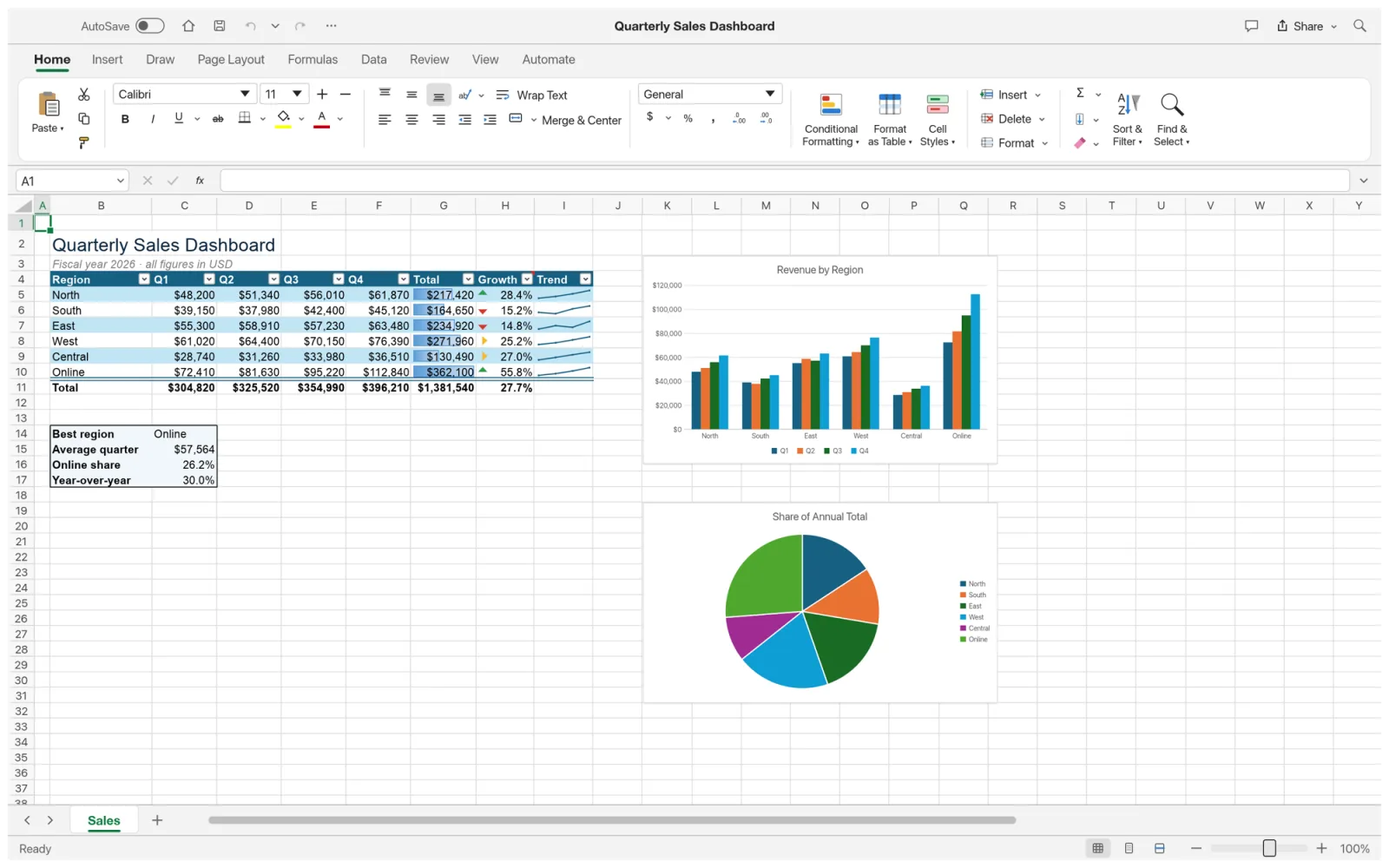
What is GridCraft
What is GridCraft?
GridCraft is an open-source spreadsheet for budgets, sales reports, gradebooks and data work: the jobs people open Microsoft Excel for. The ribbon, Name Box, sheet tabs, Format Cells and Paste Special sit where Excel users look for them, and formulas are entered the same way, with coloured references.
Behind the grid is a calculation engine with dynamic arrays, spilling and LAMBDA. XLSX is its native format, and the same app runs in the browser, so the GridCraft on this site edits your .xlsx without Excel, an account or an upload.
- 1.
Excel’s layout
Ribbon, formula bar, fill handle and shortcuts.
- 2.
501 functions
Of Excel’s 523, from VLOOKUP to GROUPBY.
- 3.
XLSX native
Charts, tables and PivotTables round-trip.
- 4.
Open source
No subscription, no licence server, no telemetry.
Formulas
Excel functions in GridCraft: 501 of 523
Its team checks every Excel function by name. These are the ones people ask about, and every one that is still missing.
Works todayNot yet
Lookup
- XLOOKUP and XMATCH: Works today
- VLOOKUP and HLOOKUP: Works today
- INDEX and MATCH: Works today
- GETPIVOTDATA: Not yet
- IMAGE: Not yet
- TRIMRANGE: Not yet
Dynamic arrays
- FILTER, SORT and UNIQUE: Works today
- VSTACK and TAKE: Works today
- GROUPBY and PIVOTBY: Works today
- Spill ranges and A1#: Works today
LAMBDA and LET
- LET and LAMBDA: Works today
- Named LAMBDAs: Works today
- MAP, REDUCE and SCAN: Works today
- BYROW, BYCOL and MAKEARRAY: Works today
Text and dates
- All 25 date and time functions: Works today
- REGEXTEST: Works today
- TEXTBEFORE, TEXTAFTER and the rest: Works today
- BAHTTEXT: Not yet
Statistics and finance
- 107 of 111 statistical functions: Works today
- 51 of 55 financial functions: Works today
- FORECAST.ETS and its 3 siblings: Not yet
- ODDFPRICE, ODDFYIELD, ODDLPRICE, ODDLYIELD: Not yet
- PERCENTOF: Not yet
Microsoft cloud and add-ins
- COPILOT and PY: Not yetcloud
- TRANSLATE and DETECTLANGUAGE: Not yetcloud
- STOCKHISTORY: Not yetcloud
- CALL, REGISTER.ID, RTD, EUROCONVERT: Not yet
Of the 501 functions present, 492 return working results; the 7 CUBE functions, WEBSERVICE and FILTERXML are placeholders. The functions marked cloud run on Microsoft’s servers, and there are no plans for them.
Your files
Open and edit .xlsx files without Excel
XLSX is the native format here, so a workbook keeps what made it work when it goes back to Excel.
Formulas and dynamic arrays
Including structured table references, defined names and spills.
Tables and styles
Table styles, themes, cell styles and Excel’s number formats.
Charts and sparklines
Column, bar and pie charts, plus sparklines in cells.
PivotTables
With the PivotTable Fields pane and report filters.
Conditional formatting and validation
Formatting rules and drop-down lists come back intact.
Comments, links and pictures
Pictures can sit inside cells and move with the data.
CSV and TSV
Open and save plain data files too.
XLSB and ODS
Their worksheet data imports, as saved values rather than formulas.
Old .xls files
Not yet. .xls import is next on the GridCraft roadmap.
Inside GridCraft
PivotTables, charts and formulas, as in Excel
Four sample workbooks, as the app renders them.
Data
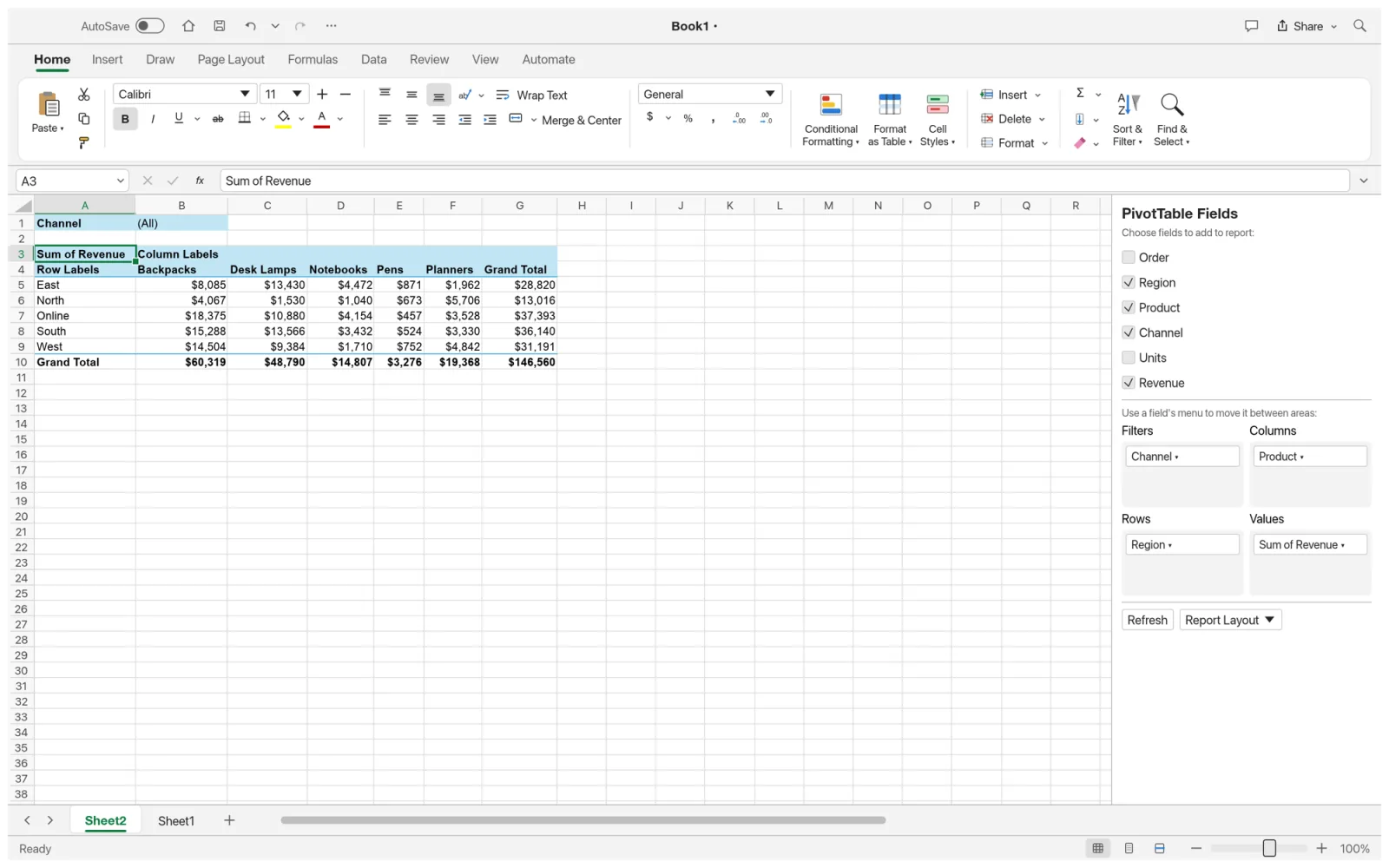
PivotTables
Drag fields into Filters, Columns, Rows and Values, then refresh as the data changes.
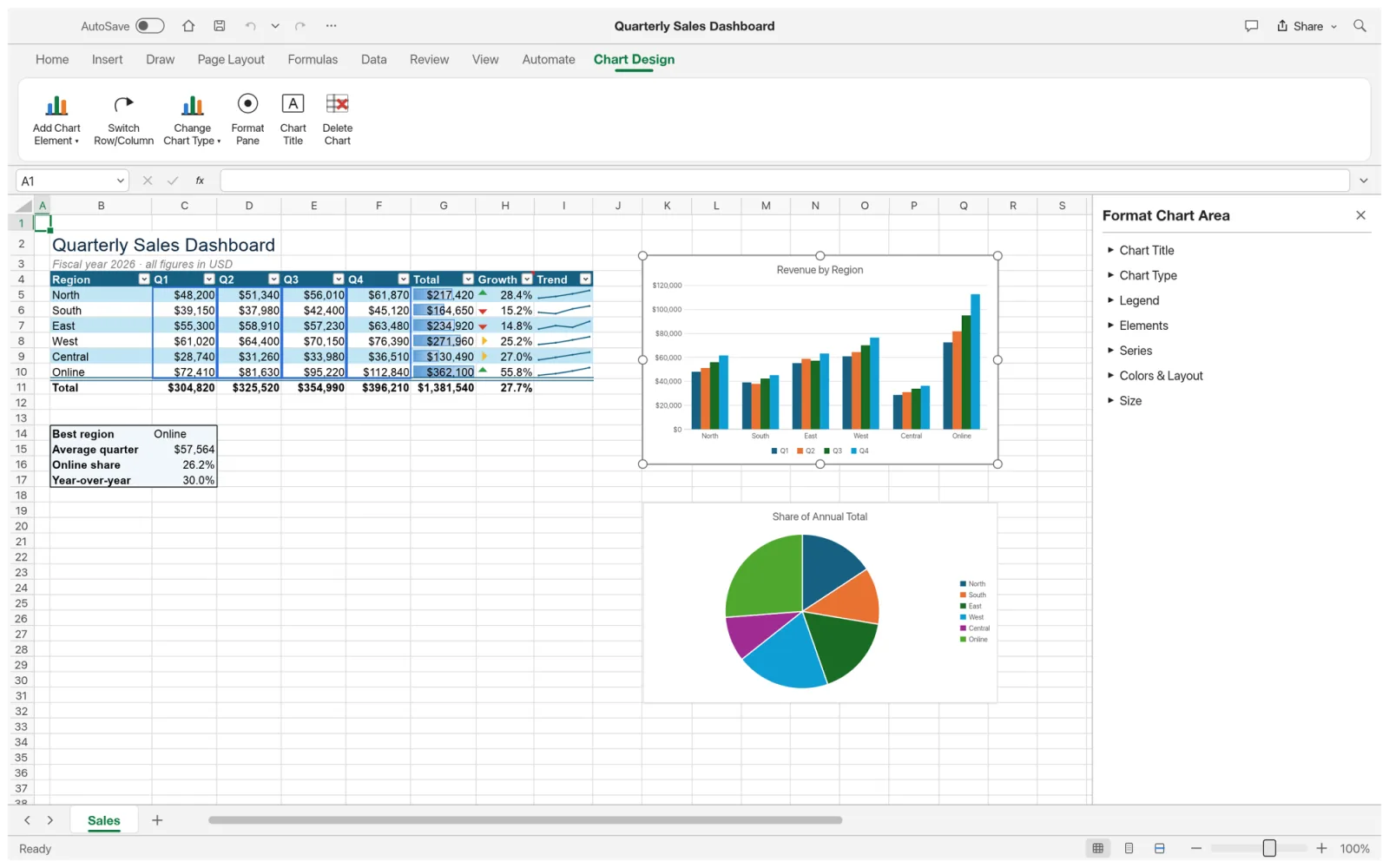
Charts
Chart Design and Format pane
Change chart type, elements and colours from the ribbon.
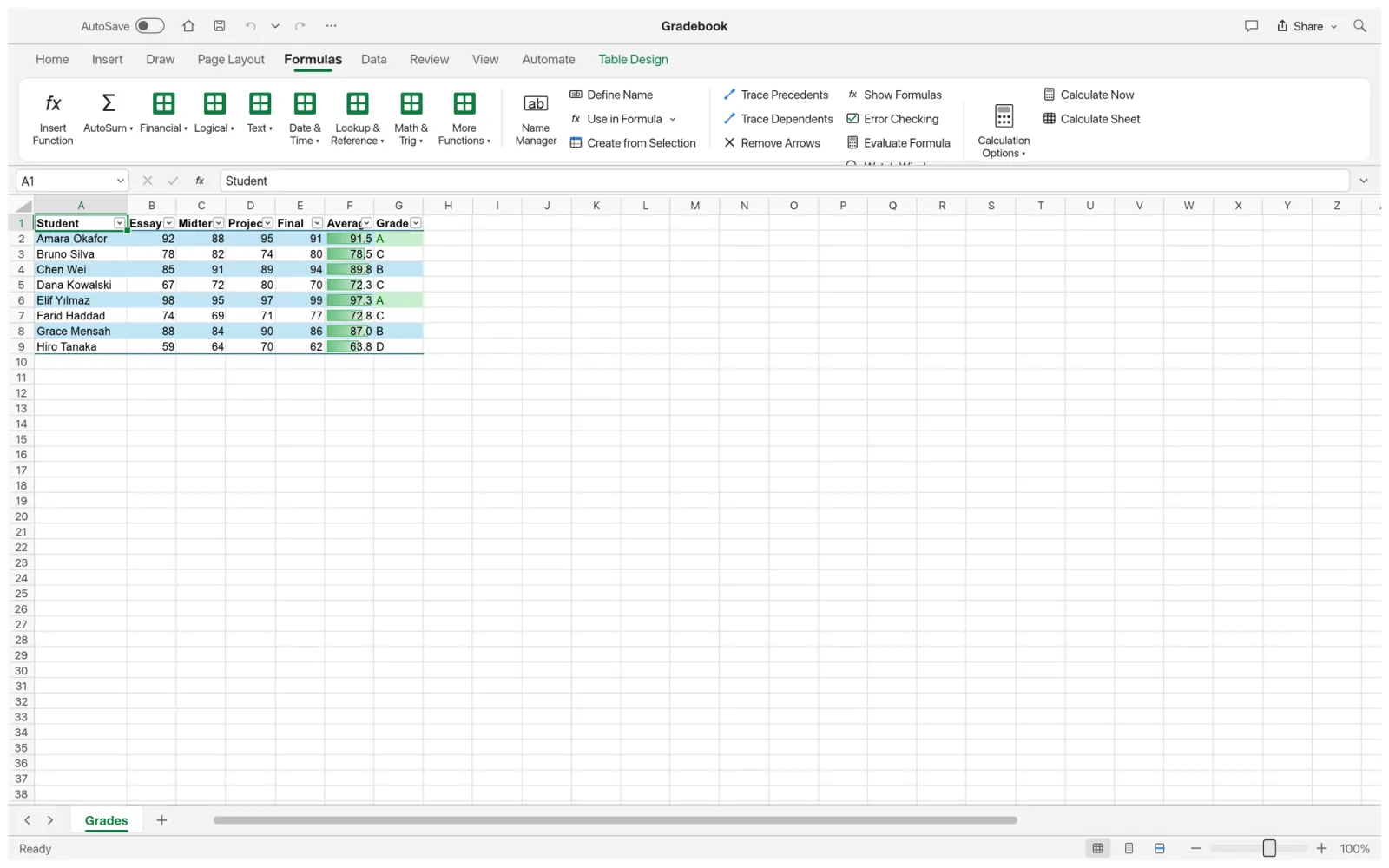
Formulas
The Formulas tab
Function library, Name Manager, Trace Precedents and Evaluate Formula.
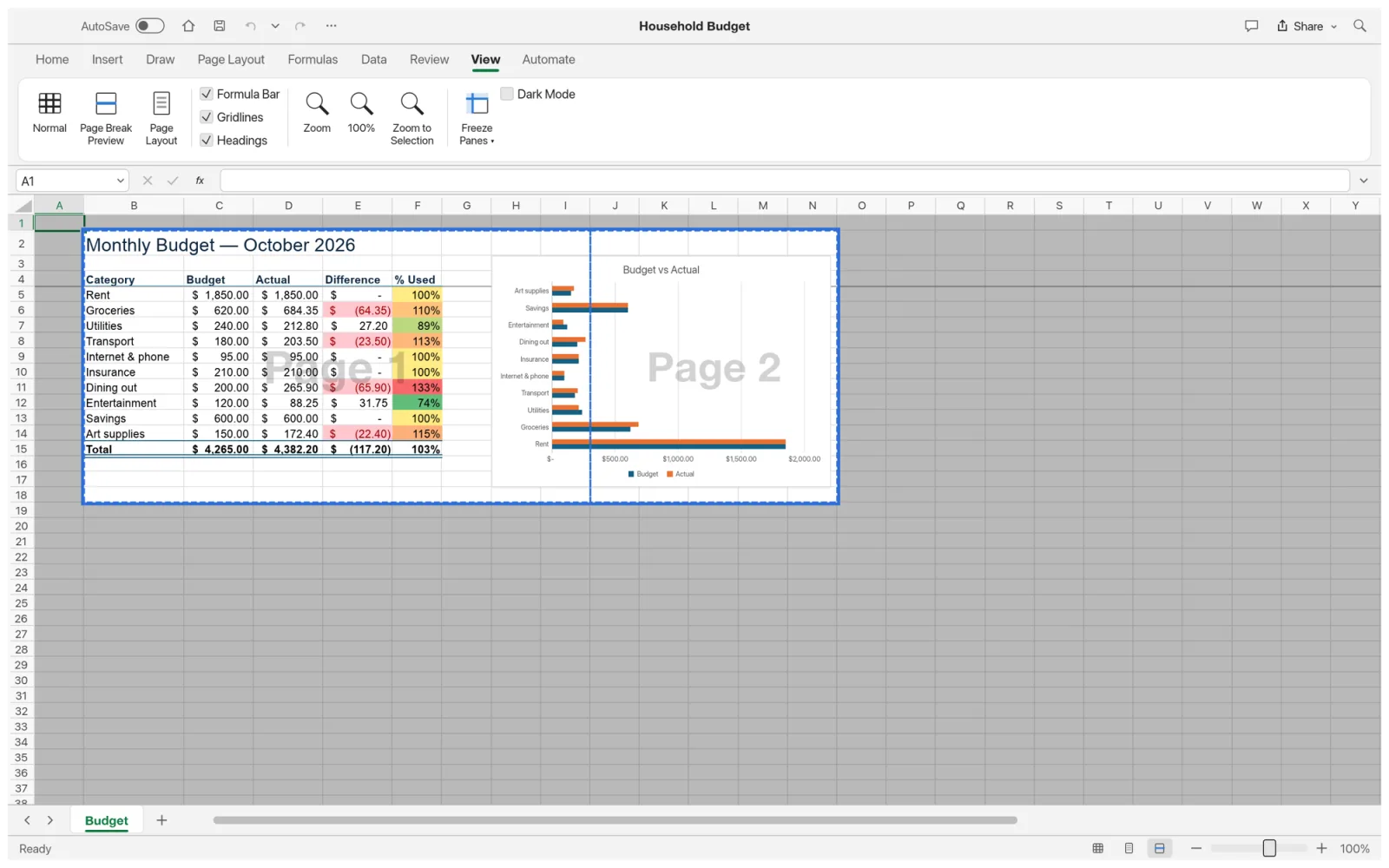
Print
Page Break Preview
See and drag page breaks before you print or export.
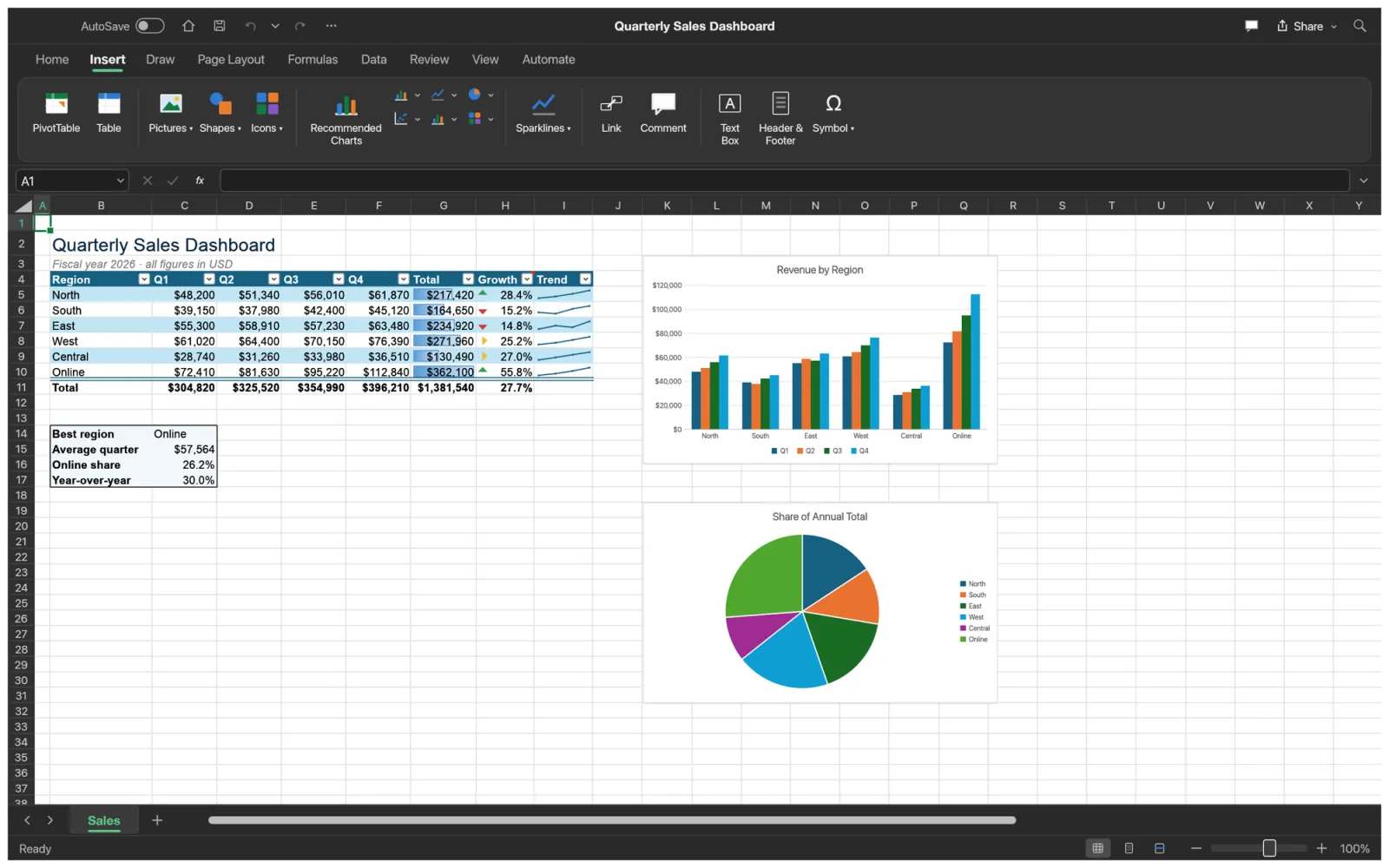
Dark mode
Easy on the eyes
A full dark theme for the ribbon and grid, here on the Insert tab.
For AI agents
An Excel-style MCP server for Claude and Codex
The command-line tool includes an MCP server, so an AI agent reads, writes, formats and charts real .xlsx workbooks with Excel’s formula language.
- MCP tools include read_range, write_range, set_cell, evaluate_formula, format_range, insert_chart, create_table, sort_range and filter.
- execute_command reaches every command, the whole ribbon included.
- Bridge it to the open window with gridcraft-cli mcp --connect to watch the agent work.
On a Mac the command-line tool is its own download (see below). GridCraft MCP docs
# Give Claude Code a spreadsheet$ claude mcp add gridcraft -- gridcraft-cli mcp# Or Codex$ codex mcp add gridcraft -- gridcraft-cli mcp# Evaluate a formula without opening anything$ gridcraft-cli eval '=XLOOKUP("b",{"a","b"},{1,2})'# → 2# Print a range of a workbook as a table$ gridcraft-cli cat budget.xlsx --range B4:F15For Excel users
GridCraft vs Microsoft Excel
As a free Excel alternative, it covers the formulas, tables and charts of everyday work. Its team puts it at 50% ready for real work, so large and complex workbooks are where it falls short.
| Feature | GridCraftFree | Microsoft Excel |
|---|---|---|
| Price | Free forever | Microsoft 365 subscription or a licence |
| Runs on | Browser, Windows, macOS, Linux, BSD | Windows, macOS, web, mobile; no Linux |
| Worksheet functions | 501 of 523 | 523 |
| Dynamic arrays and LAMBDA | Yes | Yes |
| PivotTables and charts | Yes; chart depth is still growing | Yes |
| Old .xls files | Not yet | Yes |
| Iterative calculation | Circular references stay unresolved | Yes |
| AI in the app | Bring your own agent over MCP | Copilot, with a Microsoft 365 plan |
| Maturity | Alpha, first released October 2026 | Since 1985 |
GridCraft download
Every link is the official GridCraft 0.5.0 build on GitHub. Prefer not to install anything? Open GridCraft online instead.
| System | Main download | Also available |
|---|---|---|
| Windows (64-bit) | gridcraft-0.5.0-windows-x64.msi · 12.3 MB | portable ZIP · 16.2 MB, ARM64 and 32-bit |
| macOS (Apple silicon and Intel) | gridcraft-0.5.0-macos-universal.dmg · 21.8 MB | command-line tool · 9.2 MB |
| Linux (x86_64) | AppImage · 16.7 MB | .deb · 17.8 MB, .rpm · 17.7 MB, Flatpak · 11.9 MB |
| Linux (ARM64) | AppImage · 15.4 MB | .deb · 16.8 MB, Flatpak · 10.3 MB |
| FreeBSD 14 | tarball · 17.3 MB |
The Windows installers are code-signed, the Mac app is notarized by Apple, and SHA256SUMS.txt lists a checksum for every file.
Yes. GridCraft is free and open source under MIT or Apache-2.0, with no subscription, no licence server and no telemetry.
Yes. Open GridCraft online and the full spreadsheet runs in your browser, with no sign-up. Open an .xlsx with the file picker or by dropping it on the page; Save downloads the workbook. Nothing is uploaded.
Yes. XLOOKUP, XMATCH, FILTER, SORT, UNIQUE, LET, LAMBDA and the rest of the dynamic-array functions all work, and results spill as they do in Excel.
For the 492 working functions, yes, with two known differences: decimals are compared exactly, so =0.1+0.2=0.3 returns FALSE where Excel says TRUE, and it does not iterate circular references. Links to other workbooks are dropped when a file opens.
XLSB and ODS worksheets import as values, without their formulas. Old .xls files do not open yet; .xls import is next on the roadmap. Save the file as .xlsx in another app first.
For everyday sheets, yes: the formulas, tables, charts and PivotTables you rely on are there. Its team rates it 50% ready for real work, and the gaps are fidelity on complex real-world files and very large workbooks.
Linux gets AppImage, Flatpak, .deb and .rpm builds for x86_64 and ARM64. On a Chromebook, or any computer where you cannot install software, use the online version in Chrome.
No. This GridCraft is the spreadsheet from the ArtCraft team. The Adobe Illustrator grid plug-in and the Minecraft mod with the same name are different products.
No. PhotoCraft Editor is an independent site that hosts the official GridCraft web build and links to the official downloads. The project lives on GitHub.
Open a workbook in GridCraft
The full spreadsheet, free in your browser. Start with the sales dashboard or drop in your own .xlsx.
Colophon
The screenshots on this page are from the GridCraft repository (MIT or Apache-2.0), rendered by GridCraft itself. The function counts come from the project’s function parity report.
PhotoCraft Editor is an independent site. It is not affiliated with ArtCraft or Microsoft, or with the Illustrator plug-in or Minecraft mod named GridCraft. Microsoft Excel is a trademark of Microsoft Corporation.