WordCraft: The free, open-source word processor for .docx
The Word ribbon, styles, tables, track changes, citations and mail merge, with the shortcuts your hands already know. Open a .docx in your browser, edit it and save it back as a .docx that Word opens.
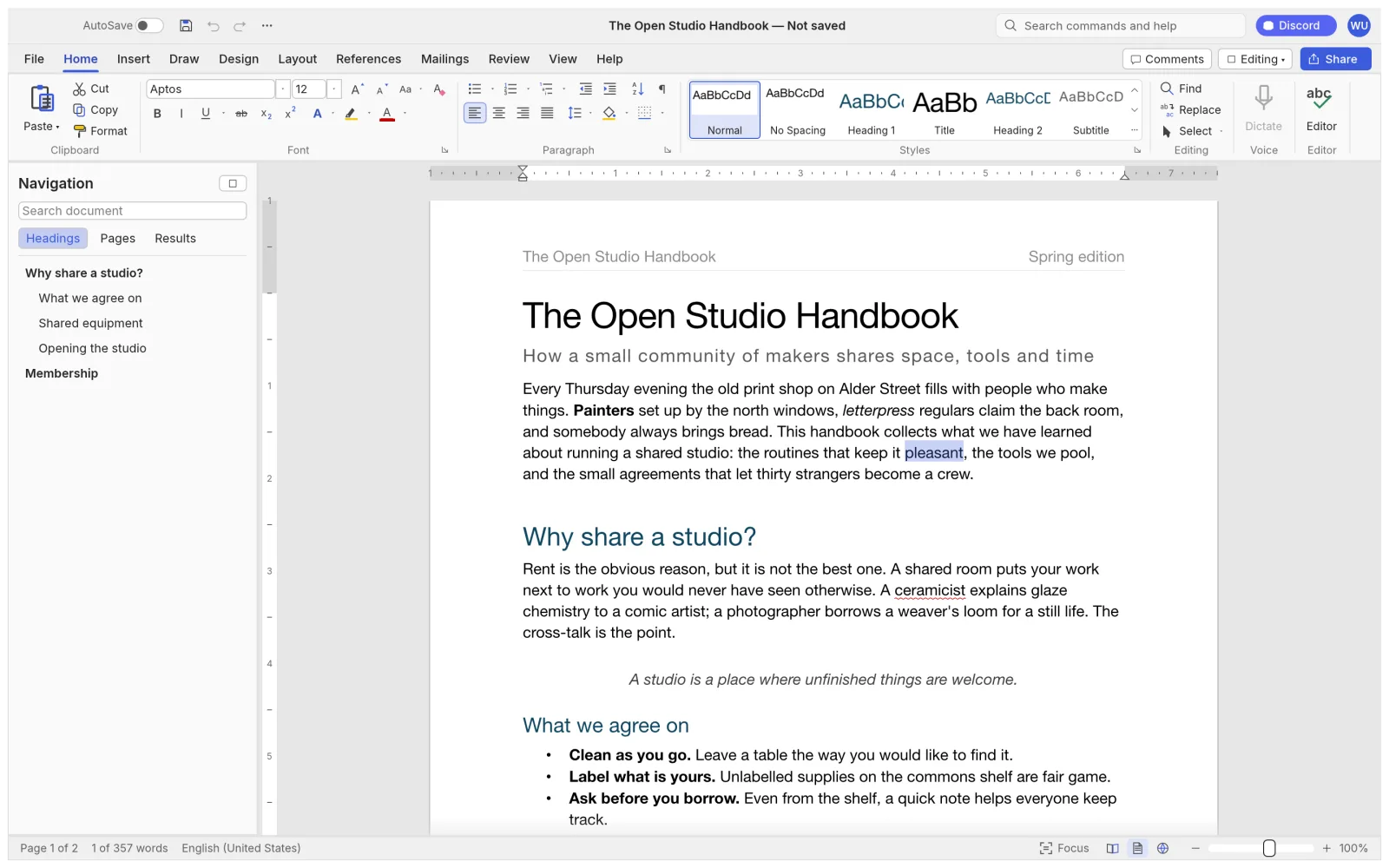
Your files
Open and edit .docx files without Word
WordCraft reads and writes .docx natively, so a document from Word goes back to Word as a .docx. Older Word files and open formats come in too, and PDF goes out with real, selectable text.
| Feature | Open in WordCraft | Save from WordCraft |
|---|---|---|
| .docx (Word 2007 and later) | Yes | Yes, its own format |
| .doc (Word 97 to 2003) | Yes | Saves as .docx |
| .odt (LibreOffice and OpenOffice) | Yes | Yes |
| .rtf, HTML and Markdown | Yes | Yes |
| LaTeX (.tex) and plain text | Yes | Yes |
| No | Export with selectable text, links and bookmarks | |
| Page images | No | Export each page as PNG |
What is WordCraft
What is WordCraft?
WordCraft is an open-source word processor for letters, reports, theses and handbooks: the documents people open Microsoft Word for. It keeps Word’s ribbon tabs and habits, so Enter continues a list, Tab demotes it, F4 repeats the last action and F7 checks spelling.
It runs natively on Windows, macOS, Linux and BSD, and the same app runs in the browser, so the WordCraft on this site is the full word processor, free and without an account. Your documents stay on your device, and spelling and grammar work offline.
- 1.
Word’s ribbon
Home, Insert, Layout, References, Mailings, Review.
- 2.
.docx in and out
Saved files open in Microsoft Word.
- 3.
Private
Spelling, grammar and editing run on your device.
- 4.
Open source
Free forever under MIT or Apache-2.0.
Where Word keeps it
Track changes, citations and page layout in WordCraft
The three tabs that decide whether a Word alternative works for real documents, as they look in WordCraft.
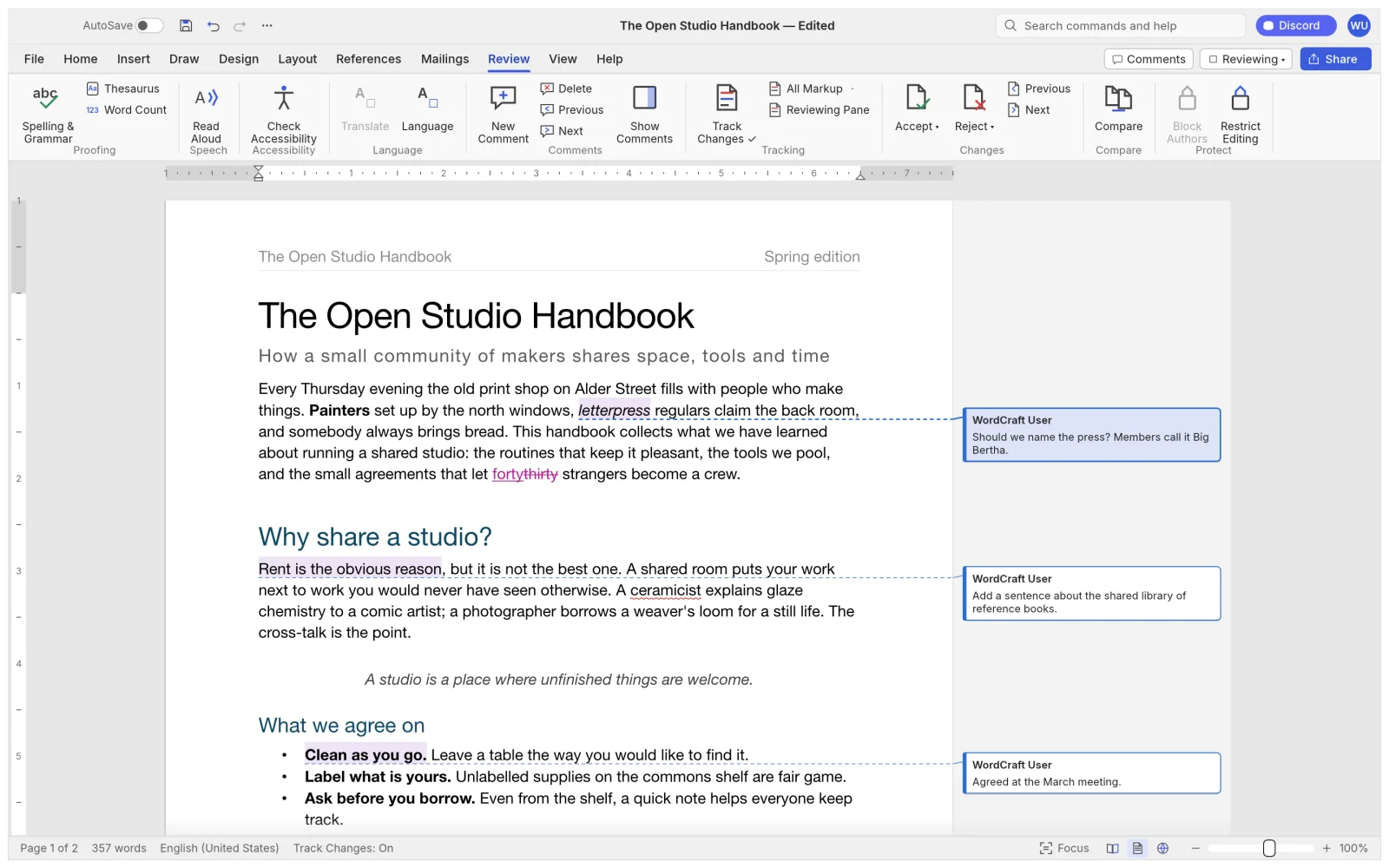
Review
Track changes and comments
Turn on Track Changes and every insertion and deletion is marked, with comments in margin balloons. Accept or reject them one by one, or compare two versions of a document.
- Spelling and grammar with suggestions, plus a thesaurus
- Compare documents and restrict editing
- Accessibility checker and document inspector
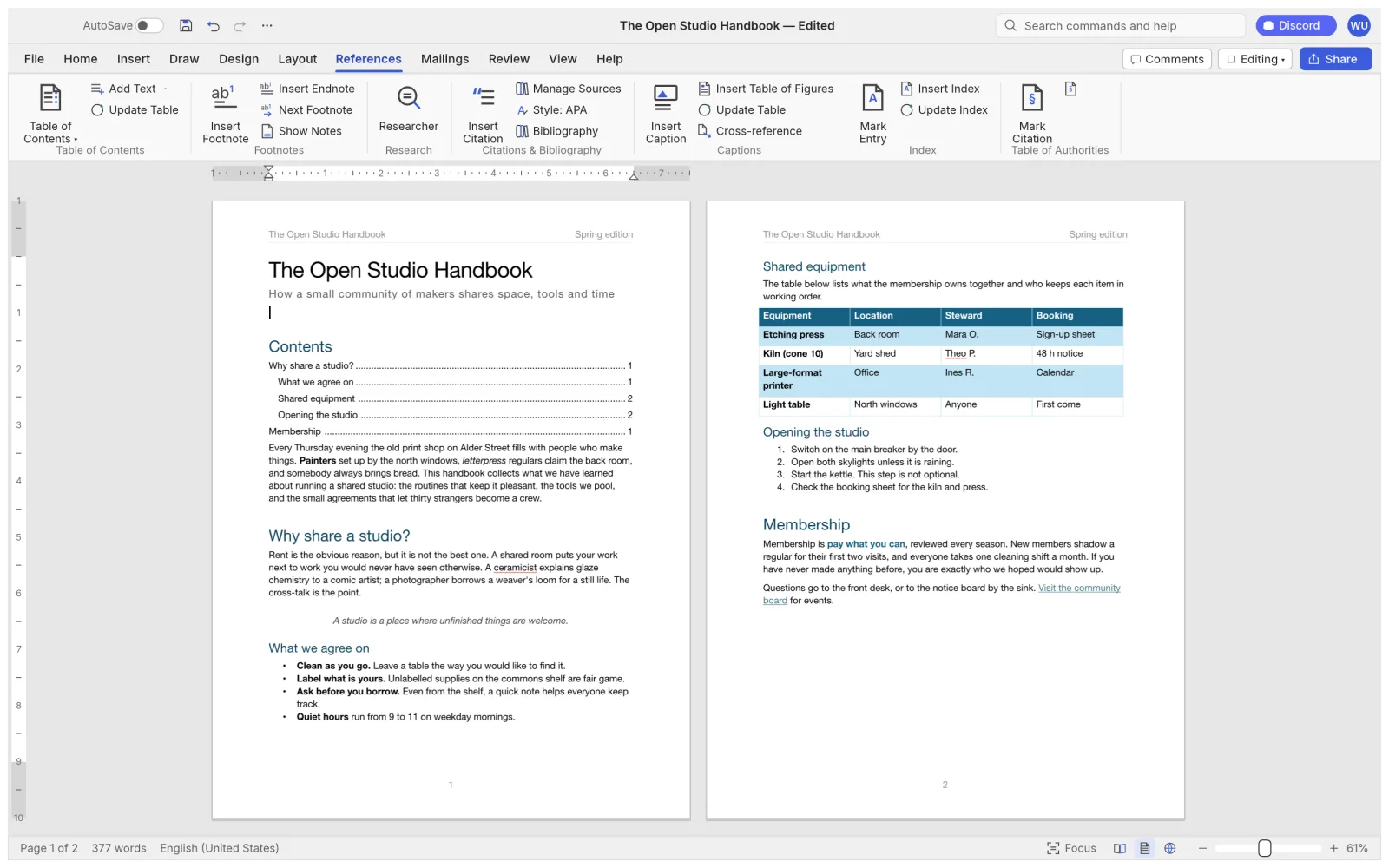
References
Citations, footnotes and a table of contents
Build a bibliography in APA, MLA, Chicago or IEEE style, add footnotes and endnotes, and let WordCraft keep the table of contents, captions and cross-references up to date.
- Table of figures and an index
- Table of authorities for legal documents
- Captions and cross-references that follow edits
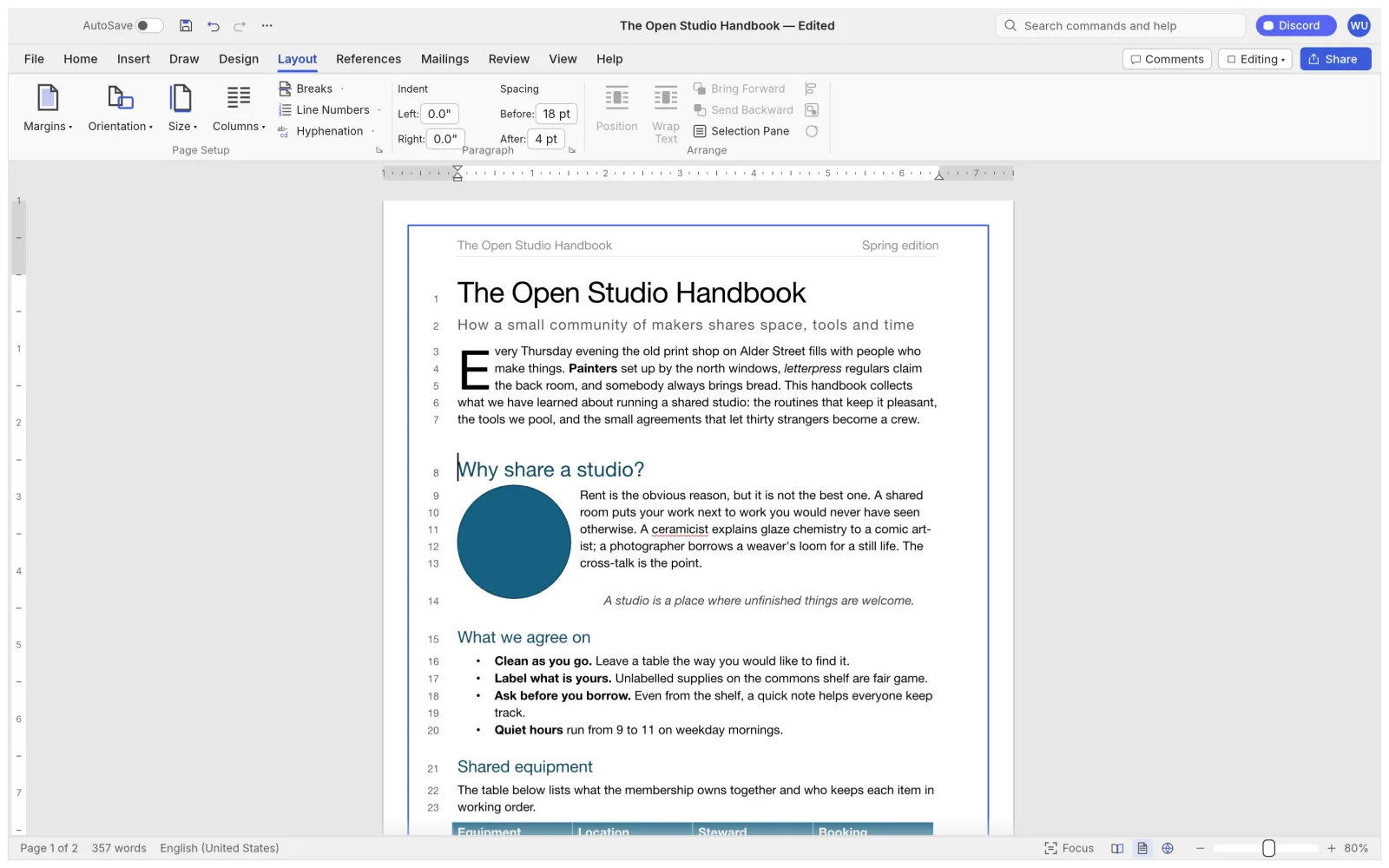
Layout
Page layout down to the line number
Margins, orientation, columns and section breaks, with headers and footers that differ on the first page or on odd and even pages.
- Drop caps, watermarks and page borders
- Automatic hyphenation and line numbers
- Pictures with text wrapping and crop
What works today
Every Word feature area in WordCraft
What WordCraft 0.5.0 covers, area by area, from the project’s own feature table.
- 01
Writing
Smart quotes, AutoCorrect, list autoformat, find and replace with regular expressions.
- 02
Formatting
Fonts, highlight, character spacing, Format Painter, Change Case.
- 03
Paragraphs
Indents on the ruler, tabs with leaders, borders, keep with next.
- 04
Styles
Live Styles gallery, Styles pane, style sets and themes.
- 05
Lists
Bullets, numbering, multilevel lists, custom formats.
- 06
Tables
Merge and split, table styles, repeated header rows, sort, formulas.
- 07
Pages
Columns, sections, headers and footers, page numbers, watermark.
- 08
Objects
Pictures with crop, recolour and background removal; shapes and text boxes.
- 09
References
Table of contents, footnotes, citations, captions, index.
- 10
Review
Track changes, comments, compare documents, restrict editing.
- 11
Mailings
Mail merge from CSV, address block, greeting line, envelopes and labels.
- 12
View
Print, web, draft and read modes, focus mode, dark mode, Navigation pane.
Honest numbers
How close WordCraft is to Microsoft Word
WordCraft is alpha software, and its team publishes how far it has come. Their figures, from the WordCraft roadmap:
- of Word’s ribbon features have a command
- 88%
- of the way to everyday essentials (team estimate)
- 63%
- of the way to replacing all of Word (team estimate)
- 60%
- to re-lay out a 188-page document as you type
- 1.4 ms
For Word users
WordCraft vs Microsoft Word
As a free Microsoft Word alternative, WordCraft already covers the writing, review and reference work. Charts, SmartArt and printing still have gaps.
| Feature | WordCraftFree | Microsoft Word |
|---|---|---|
| Price | Free forever | Microsoft 365 subscription or a licence |
| Runs on | Browser, Windows, macOS, Linux, BSD | Windows, macOS, web, mobile; no Linux |
| .docx files | Reads and writes | Native |
| Track changes and comments | Yes | Yes |
| Citations and bibliography | APA, MLA, Chicago, IEEE | Yes |
| Mail merge | From CSV, with envelopes and labels | Yes |
| Live co-editing | No | Through OneDrive |
| Charts and SmartArt | Not yet kept through a .docx round trip | Yes |
| Printing | Through PDF export; native printing is next | Yes |
| Maturity | Alpha, first released October 2026 | Since 1983 |
For AI agents
Let Claude or Codex edit Word documents with WordCraft
WordCraft ships a command-line tool with an MCP server, so an AI agent opens, edits and saves real .docx files with the same 422 commands as the ribbon.
- Agent tools include execute, batch, type_text, select_text, inspect_document, render_page and save_document.
- inspect_document lets the agent check its own edits without screenshots.
- Run the app with --control and the agent can drive the open window too.
On a Mac the command-line tool is its own download (see below). WordCraft MCP docs
# Give Claude Code a word processor$ claude mcp add wordcraft -- wordcraft-cli mcp# Or Codex$ codex mcp add wordcraft -- wordcraft-cli mcp# No agent needed for quick jobs$ wordcraft-cli convert report.docx report.pdf$ wordcraft-cli text report.docxWordCraft download
Every link is the official WordCraft 0.5.0 build on GitHub. Prefer not to install anything? Open WordCraft online instead.
| System | Main download | Also available |
|---|---|---|
| Windows (64-bit) | wordcraft-0.5.0-windows-x64.msi · 74.5 MB | portable ZIP · 89.3 MB, ARM64 and 32-bit |
| macOS (Apple silicon and Intel) | wordcraft-0.5.0-macos-universal.dmg · 96.6 MB | command-line tool · 80.8 MB |
| Linux (x86_64) | AppImage · 86.2 MB | .deb · 91.2 MB, .rpm · 90.7 MB, Flatpak · 66.0 MB |
| Linux (ARM64) | AppImage · 84.1 MB | .deb · 89.5 MB, Flatpak · 63.7 MB |
| FreeBSD 14 | tarball · 92.4 MB |
The Windows installers are code-signed, the Mac app is notarized by Apple, and SHA256SUMS.txt lists a checksum for every file.
Yes. WordCraft is free and open source under MIT or Apache-2.0: no subscription, no account and no paid tier.
Yes. Open WordCraft online and the full word processor runs in your browser, with no sign-up. Open a .docx from your computer; Save downloads the edited file. The document is not uploaded anywhere.
Yes. WordCraft saves standard .docx files that Word opens. Charts and SmartArt are the exception for now: they do not survive a round trip yet, so keep a copy of documents that rely on them.
Yes. It opens Word 97 to 2003 .doc files and saves them as .docx. It also opens .odt, .rtf, HTML, Markdown, LaTeX and plain text.
The desktop app works fully offline, spelling and grammar included. The online version needs the page to load once; after that your document lives in the browser tab.
For writing, reviewing and citing, yes. Its team rates it at 63% of the way to Word’s everyday essentials and 60% of the way to all of Word, so test it on your own documents before you switch. Live co-editing and native printing are not there yet.
English, Simplified and Traditional Chinese, Japanese, Brazilian Portuguese, Spanish, Ukrainian, Serbian and Estonian. It follows your system language by default.
No. This WordCraft is the word processor from the ArtCraft team. The browser word game and the translation companies with the same name are different products.
No. PhotoCraft Editor is an independent site that hosts the official WordCraft web build and links to the official downloads. The project lives on GitHub.
Open a .docx in WordCraft
The full word processor, free in your browser. Start from the sample handbook or your own document.
Colophon
The screenshots on this page are from the WordCraft repository (MIT or Apache-2.0), rendered by WordCraft itself. The progress figures are the WordCraft team’s own, from its roadmap.
PhotoCraft Editor is an independent site. It is not affiliated with ArtCraft or Microsoft, or with the WordCraft word game. Microsoft Word is a trademark of Microsoft Corporation.