ArtCraft Launcher: Every Craft app in one click
The official launcher from the ArtCraft team installs the right build of all twelve Craft apps and keeps them up to date. Free, for Windows, Mac and Linux.
What it is
What is ArtCraft Launcher?
Each Craft app ships its own builds for every system, a dozen release pages in all. ArtCraft Launcher puts them in one window: it shows which apps you have and which version, installs the right build for your system and processor, and updates the ones you use.
It is a small native app, not a web view, that can sit in your menu bar or system tray. It installs each app from the app’s official release package, so an app installed by the launcher is the same as one you installed by hand, and it finds the apps you already installed yourself.
- 1.
One click
Picks the DMG, MSI, AppImage, .deb or .rpm you need.
- 2.
Checked
Every file is verified against its SHA-256 before install.
- 3.
Up to date
Update all, or one app, with a notification when one is out.
- 4.
Official
Made by the ArtCraft team, MIT or Apache-2.0.
How to use it
How to install the Craft apps with ArtCraft Launcher
- 01
Download the launcher
Take the file for your system from the table below: the DMG on a Mac, the MSI on Windows, the AppImage, .deb or .rpm on Linux.
- 02
Install and open it
Drag it to Applications on a Mac or run the MSI on Windows. The Windows installer needs no admin rights.
- 03
Pick your apps
Press Install on PhotoCraft, LightCraft or any other card. Filter by Installed, Updates or Not installed, or search by name.
- 04
Keep them current
When a new version is out, the launcher tells you. Press Update all, or update one app at a time.
A look around
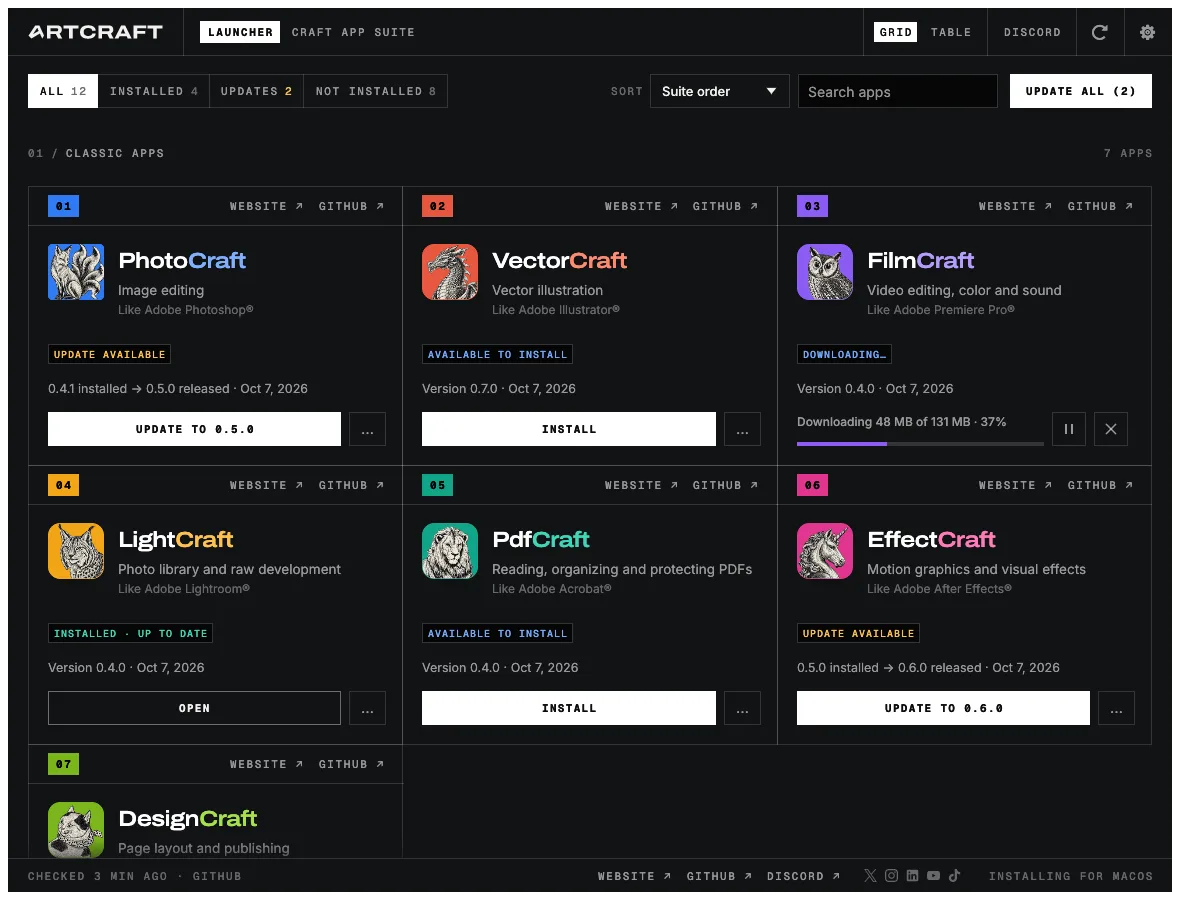
ArtCraft Launcher in grid or table view
Two views of the same twelve apps, in a dark or a light theme.
Grid view
One card per app
Each card shows the app’s status, the installed and latest version and the release date, with Install, Update or Open as its button. A download shows its progress and can be paused.
- Website and GitHub links on every card
- Status filters: Installed, Updates, Not installed
- Sort and search the suite
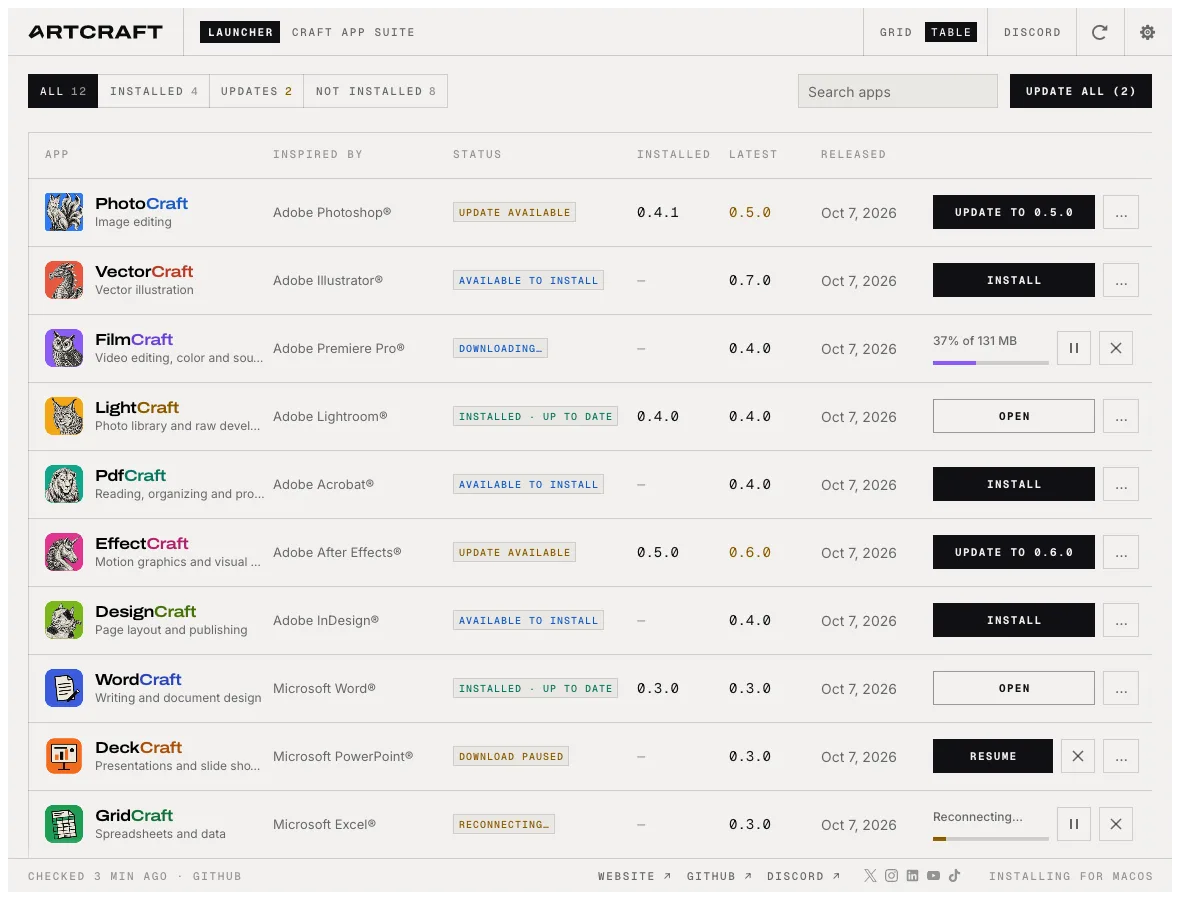
Table view
Versions side by side
The table view lists every app with its status, installed version, latest version and release date, so you see what needs an update in one line each.
- Sortable columns
- The same Install, Update and Open actions
- Interface in 11 languages, English by default
ArtCraft Launcher download
Every link is the official ArtCraft Launcher 0.3.2 build on GitHub. The launcher updates itself, so an older version from this table asks to update on first start. All releases are on the GitHub releases page.
ArtCraft Launcher for Windows
Windows 10 and 11. The installers set up the launcher for the current user, with no admin rights needed.
| Your PC | Installer | Portable (no install) |
|---|---|---|
| 64-bit Intel or AMD (most PCs) | artcraft-launcher-0.3.2-windows-x64.msi · 9.0 MB | portable ZIP · 9.7 MB |
| ARM (Snapdragon, Surface Pro X) | artcraft-launcher-0.3.2-windows-arm64.msi · 8.3 MB | portable ZIP · 9.1 MB |
| 32-bit | artcraft-launcher-0.3.2-windows-x86.msi · 8.5 MB | portable ZIP · 9.1 MB |
ArtCraft Launcher for Mac
macOS 11 Big Sur or later: artcraft-launcher-0.3.2-macos-universal.dmg · 18.0 MB. One universal app for Apple silicon and Intel, signed and notarized by Apple. Open the DMG and drag ArtCraft Launcher to Applications.
ArtCraft Launcher for Linux
glibc 2.35 or newer (Ubuntu 22.04, Debian 12, Fedora 36 and later).
| Format | x86_64 | ARM64 (aarch64) |
|---|---|---|
| AppImage (runs anywhere) | AppImage · 11.8 MB | AppImage · 11.2 MB |
| Debian, Ubuntu, Mint, Pop!_OS | .deb · 12.2 MB | .deb · 11.7 MB |
| Fedora, openSUSE, RHEL | .rpm · 12.1 MB | .rpm · 11.6 MB |
| Flatpak | .flatpak · 8.4 MB | .flatpak · 7.5 MB |
| Tarball | .tar.gz · 11.9 MB | .tar.gz · 11.2 MB |
# AppImage: make it executable and run it
chmod +x artcraft-launcher-0.3.2-linux-x86_64.AppImage
./artcraft-launcher-0.3.2-linux-x86_64.AppImage

# Debian or Ubuntu
sudo apt install ./artcraft-launcher-0.3.2-linux-x86_64.deb
The AppImage, .deb and .rpm are the recommended builds: inside its Flatpak sandbox the launcher reaches the rest of the system only as far as the sandbox allows. The tray icon needs the AppIndicator extension on GNOME. RISC-V gets a .deb · 12.1 MB too, and FreeBSD 14 a tarball · 11.7 MB.
Check your download
Each release includes SHA256SUMS.txt. Compare it with the checksum of your file:
shasum -a 256 artcraft-launcher-0.3.2-macos-universal.dmg       # macOS
sha256sum artcraft-launcher-0.3.2-linux-x86_64.AppImage         # Linux
certutil -hashfile artcraft-launcher-0.3.2-windows-x64.msi SHA256  # Windows
Where ArtCraft Launcher installs the apps
The launcher puts each app where your system normally keeps applications, from the app’s official release package:
| System | Where | How |
|---|---|---|
| macOS | /Applications | Copied from the app’s signed, notarized DMG |
| Windows | C:\Program Files | The app’s MSI, with a Start menu entry and an entry in Apps & features |
| Linux | /usr/bin and /usr/share/applications | The app’s .deb or .rpm, after your password prompt; otherwise a Flatpak, or an AppImage in ~/Applications |
| FreeBSD | /usr/local | The release tree, with a password prompt; ~/.local without polkit |
Updates use the same format the app was installed with, and a running app is never replaced. The launcher’s own log is in its data folder, for example ~/Library/Application Support/ArtCraft Launcher on a Mac.
Which way to get the apps
ArtCraft Launcher, separate downloads or online
The launcher is the easy way to install several Craft apps. To try one before installing anything, every app also runs online on this site.
| Feature | ArtCraft Launcher | Download each app | Online on this site |
|---|---|---|---|
| Install | One click per app, right build picked | Pick the file on each release page | Nothing to install |
| Updates | Notified; Update all | Check each app yourself | Always the latest version |
| Checksums | Checked for you | Check them yourself | Not needed |
| Works offline | Yes, once installed | Yes | Needs the page to load |
| Every feature | Yes | Yes | Most; a few desktop features are missing |
The twelve apps in ArtCraft Launcher
Each one also runs online here, so you can try it before you install it.
| App | Like | Try it |
|---|---|---|
| PhotoCraft | Photoshop | Online |
| VectorCraft | Illustrator | Online |
| FilmCraft | Premiere Pro | Online |
| LightCraft | Lightroom | Online |
| PdfCraft | Acrobat | Online |
| EffectCraft | After Effects | Online |
| DesignCraft | InDesign | Online |
| GridCraft | Excel | Online |
| WordCraft | Word | Online |
| DeckCraft | PowerPoint | Online |
| CADCraft | AutoCAD | Online |
| SoundCraft | Pro Tools | Online |
FigCraft, the Figma-style design app, is newer than launcher 0.3.2 and is not in it yet. Download it from its own page.
Yes. The launcher and every app it installs are free and open source under MIT or Apache-2.0, with no account.
It is the official launcher from the ArtCraft team, published on GitHub with its source code. The Mac app is signed and notarized, the Windows installers are signed, and every app it downloads is checked against the release’s SHA-256 checksum before it is installed. It is early alpha software, so expect rough edges.
No. Each app has its own installers on its page, and every app runs online on this site with nothing to install. The launcher saves time when you use several of them.
Yes. The launcher finds apps you installed by hand and updates them in the same format.
When a new version is out, Update and restart downloads it, verifies it, replaces the installed copy and reopens it.
English, Brazilian Portuguese, Czech, French, German, Hungarian, Japanese, Polish, Russian, Simplified Chinese and Spanish. It follows your system language by default.
No. The community built several launchers for the Craft apps first, a few with similar names, and the official one credits them. This page covers the official ArtCraft Launcher from storytold/craft-launcher.
No. PhotoCraft Editor is an independent site that links to the official downloads on GitHub. ArtCraft’s own site is getartcraft.com.
Get all twelve Craft apps
Download ArtCraft Launcher and install the apps you need, or try any of them online first.
Colophon
The screenshots on this page are from the craft-launcher repository (MIT or Apache-2.0).
PhotoCraft Editor is an independent site. It is not affiliated with ArtCraft. The app names belong to their makers.